
PE Quick Start Guide
PE Pure Embedded Ethernet Switch Quick Start Guide
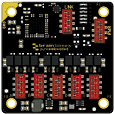
This guide covers the PE-405 and PE-415 Pure Embedded Ethernet Evaluation Kits, which include the PE-505/PE-508 (10/100) or PE-515 (Gigabit) Ethernet Switch modules.
Box Contents
PE-405 Pure Embedded 10/100 Ethernet Eval Kit
- PE-505: 5 Port 10/100 Ethernet Switch
- 10/100 Evaluation Board
- 5x IDC Header to RJ45 Cable
- IDC Headers
- USB Power Cable
PE-415 Pure Embedded 1G Ethernet Eval Kit
- PE-515: 5 Port 1G Ethernet Switch
- 1G Evaluation Board
- 5x IDC Header to RJ45 Cable
- IDC Headers
- USB Power Cable
Board Overview
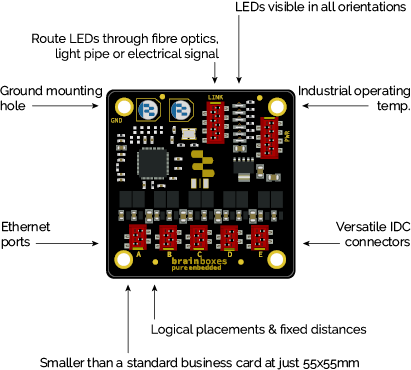
Observe all Electrostatic Discharge (ESD) precautions. Failure to do so can result in damage to the equipment.
Step 1: Out of the Box
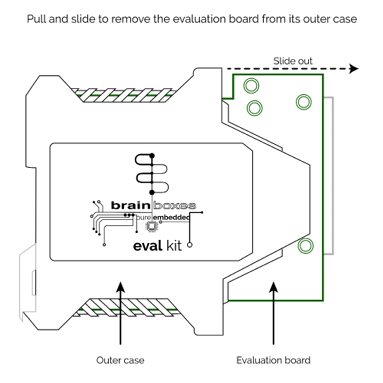
Pull and slide to remove the evaluation board from its outer case.
Step 2: Set-up
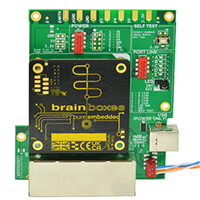
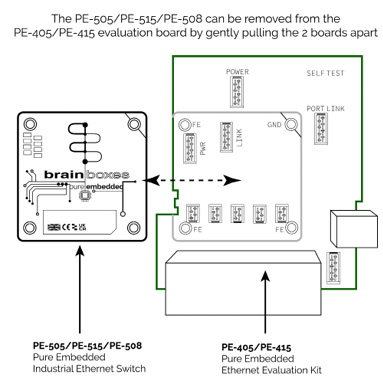
The PE-505/PE-515/PE-508 can be removed from the PE-405/PE-415 evaluation board by gently pulling the 2 boards apart.
Step 3: Power
Power indicator LEDs illuminate green when sufficient power is supplied through the USB cable.
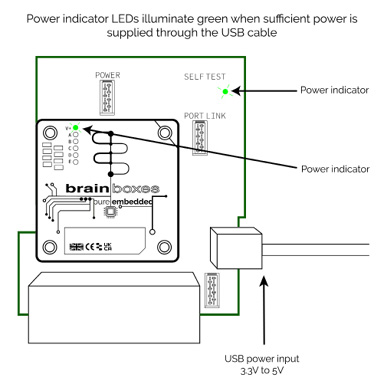
USB power input accepts 3.3V to 5V.
Step 4: Network Connection
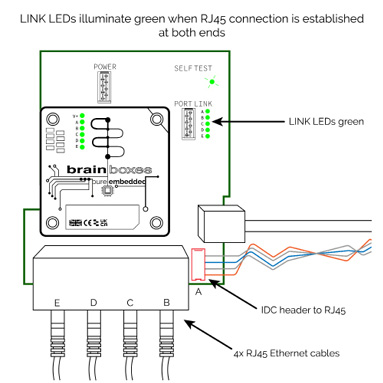
LINK LEDs illuminate green when an RJ45 connection is established at both ends. Connect the IDC header to RJ45 cables to your network devices.
Operating Environment
Brainboxes PE devices should be installed in industrial enclosures suitable for operating temperatures from -40°C to +85°C (-40°F to +185°F). The devices operate above ambient temperature during prolonged use.