
ES Light-Industrial Security
Anyone with access to the network can access the webpage of your ES device and change its settings. To prevent this from occurring, there are security features available on the device that can restrict access to certain web pages to account holders only.
Administrator Access Settings
Creating an Administrator account restricts access to the Security Page to the Administrator account holder. All other pages are still accessible to other users.
To create an Administrator account:
-
Open the device's Webpage by typing the device's IP address into a browser
-
On the left hand menu, click Security. This will open the device's Security Settings page.
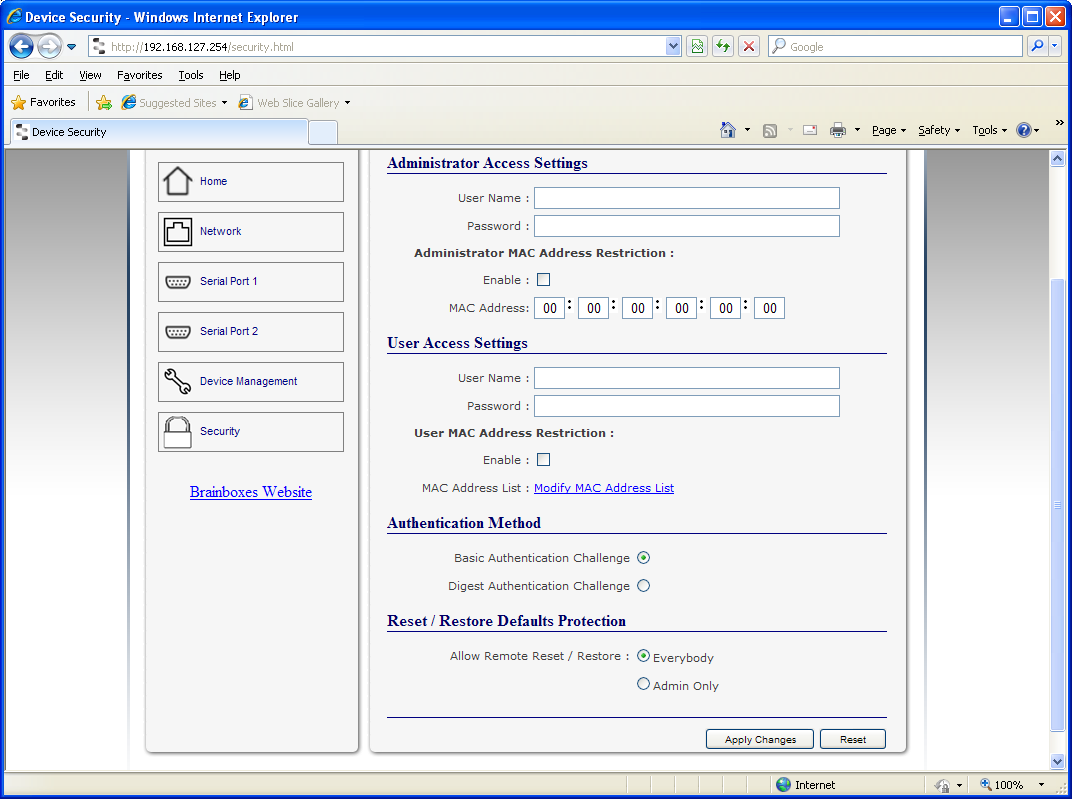
-
Enter a username and password in the "Administrator Access Settings" section
-
Click "Apply Changes" at the bottom of the page.
-
To access the security page of the device via the webpage again, you will be prompted with a log in prompt. Only the administrator will have access to this page.
User Access Settings
Creating a User Access account restricts complete access to the web page interface of your device to a User Account or Administrator account holder. No configuration page can be accessed without logging in using the user or administrator log on credentials.
-
A User account may be created without an Administrator account.
-
Both an Administrator and User Account can be set up on the same device. If both are setup, the Security Page will be restricted to the Administrator account holder only. If just a User is setup, then the User has access to all areas.
To create a User account:
-
Open the device's Webpage by typing the device's IP address into a browser (see the Web Page Interface section for further details).
-
On the left hand panel, click Security. This will open the device's Security Settings page.
-
Enter a username and password in the "User Access Settings" section
-
Click "Apply Changes" at the bottom of the page.
-
To access the web interface of the device again, you will be prompted with a log in prompt. Only an administrator or user will be able to log in.
MAC Address restriction
In addition to Administrator and User accounts to restrict access to users with the correct log on credentials, there is a feature called "MAC address restriction"
-
MAC address restriction is available under both Administrator and User settings.
-
Enabling MAC address restriction means access to the device will be limited to Administrators or Users with the MAC addresses specified in the MAC Address list.
-
The Administrator/User is expected to always log in from the same MAC address. Even if the correct username and password are entered, access will be refused if the MAC address is different.
WinSock and UPnP communications are also restricted to specified MAC addresses.
-
Administrators are automatically Users, so there is no need to add the Administrator MAC address to the User MAC address list.
-
With MAC address restriction enabled, the device will only appear visible on specified MAC addresses.
Restricting "Reset/Restore Default"
Once an Administrator account is set up, access to the "Device Management" page to "Reset or Restore Default settings" is still available to all users. Alternatively, if both an Administrator and User are set up, both the Administrator and User can access the page.
To avoid any unauthorised "Resetting or Restoring to Default", the following features are available:
| Option | Description |
|---|---|
| Everybody | This will restrict the ability to reset or restore to those with an administrator or user account |
| Admin only | This will restrict the ability to reset or restore to the administrator only |
You must set up an Administrator account or a User account (or both depending on requirements) for "Reset/Restore Defaults Protection" to take effect.
Authentication Method
There are two authentication methods:
| Method | Description |
|---|---|
| Basic Authentication Challenge | Log on credentials are passed as plaintext over the network. |
| Digest Authentication Challenge | Log on credentials are encrypted when sending over the network and as such, more secure than Basic Authentication Challenge. |