
How do I configure the BB-400 using the BB-CLI configuration file?
The configuration settings on the BB-400 are stored as a YAML file in the /boot partition of the device. The BB-CLI reads and writes to this file. Below is a brief guide on each section of the configuration file.
version:
The version section has information regarding the product number, the hardware revision code and the version of software currently installed on the device. These settings cannot be set.
io:
This section contains settings relating to the DIO lines and the protocol settings used by the BB-IO-Server.
fw_version:
This represents the Arduino DIO firmware version number. To install a new firmware version on the Arduino, input the new firmware file location as an argument.
global:
This is the DIO lines configuration settings that apply to all the 8 DIO lines:
| Setting name | Description | Possible values |
|---|---|---|
| counter_update_direction | This is when the counter needs to be updated on either the falling edge or rising edge of the input signal | falling_edge rising_edge |
| counter_mode | This is the size of the register to store the count value 16 bit = 0 -> 65,536 , 32 bit = 0 -> 4,294,967,296 | 16_bit_counter 32_bit_counter |
lines:
This contains the settings that can be set individually on each DIO line:
| Setting name | Description | Possible values |
|---|---|---|
| label | User defined label for the DIO line | Any string containing alphabets, numbers, spaces, underscore and hyphen. |
| mode | Whether the line is an input or output or not used | input output not_set unused |
protocols:
This section contains the settings for the different protocols
ascii_tcp:
Contains the port number and the enabled status.
modbus_tcp:
Modbus TCP server conforms to the Modbus TCP protocol as included on Brainboxes' digital IO modules ED-588 or ED-008. Not implemented for this release.
ws_server:
Contains the port number and enabled status.
virtual_serial_port:
The DIO on the BB-400 can be accessed through the virtual serial port to send and receive ASCII commands. The path to the virtual serial port and the enabled state is stored here.
polling_interval:
Describes how frequently the DIO needs to be polled to get the Digital IO lines states (in seconds).
rest:
REST server allows GET and POST requests to view and modify IO state. This section contains the port number and the enabled status.
| Protocol | Setting name | Description | Possible values |
|---|---|---|---|
| ascii_tcp | enabled | Whether the protocol is enabled or disabled | true false |
| ascii_tcp | port | Port number the protocol can access | Any number between 0 - 65535 |
| modbus_tcp | enabled | Whether the protocol is enabled or disabled | true false |
| modbus_tcp | port | Port number the protocol can access | Any number between 0 - 65535 |
| modbus_tcp | respond_to_slave_ids | Slave ids the modbus master should respond to | range or number between 0 and 255 |
| modbus_tcp | maximum_connections | Maximum allowed connections at a given time | Number between 0 and 255 |
| modbus_tcp | accept_all_addresses | - | |
| modbus_tcp | idle_timeout | - | |
| rest | enabled | Whether the protocol is enabled or disabled | true false |
| rest | port | Port number the protocol can access | Any number between 0 - 65535 |
| ws_server | enabled | Whether the protocol is enabled or disabled | true false |
| ws_server | port | Port number the protocol can access | Any number between 0 - 65535 |
| virtual_serial_port | enabled | Whether the virtual serial port is enabled or disabled | true false |
| virtual_serial_port | path | Symlink to the virtual serial port which can be used to access the Arduino through the BB-IO-Server | Any valid path |
network:
This section contains settings related to ethernet interfaces, Wi-Fi and UPnP (Universal Plug and Play).
eth0 and eth1:
This is one of the 2 ethernet interfaces on the BB-400.
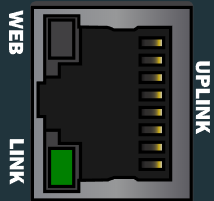
eth0 corresponds to the UPLINK port on the front of the case.
eth1 corresponds to the LAN port of the front of the case.
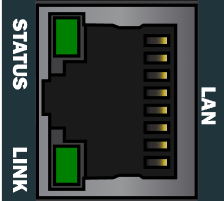
interface and connection settings are common to eth0 and eth1.
interface:
| Setting name | Description | Possible values |
|---|---|---|
| mac | MAC address | Stores the MAC address of the eth0 interface |
| status | Status of the interface | active inactive |
connection:
| Setting name | Description | Possible values |
|---|---|---|
| name | Name of the connection | Any string with alphabets, numbers, spaces, underscore and hyphen. |
| type | IP address assignment type | dhcp static |
| ip | IP address of the connection | Can be set only when type is static |
| gateway | IP address of the gateway | Can be set only when type is static |
radio:
This section has settings related to the wireless connections.
wlan0
Maintains a list of saved connections and status of wlan0. Status can be active or inactive.
wifiap
This section deals with the BB-400 access point mode settings. The SSID name, password and status are the settings stored here. Status can be active or inactive.
bluetooth
The status of the bluetooth is stored in this section. Status can be active or inactive.
upnp:
These values are used by the UPnP server. The UPnP server enables you to find the BB-400 device on the network.
| Setting name | Description | Possible values |
|---|---|---|
| enabled | Whether the server is enabled or disabled | true false |
| port | Port number the server runs on | Any number between 0 - 65535 |
serial:
Contains all settings related to the serial port on the BB-400. This port is available on the device as /dev/ttySC0
| Setting name | Description | Possible values |
|---|---|---|
| enabled | Whether the serial port is enabled or disabled | true false |
| type | Serial port protocol - RS232, RS422 or RS485 | rs232 rs422 rs485 |
The other settings are not yet implemented.
docker:
This setting is used to add/ move Docker containers from the system.
| Setting name | Description | Possible values |
|---|---|---|
| enabled | Whether docker is enabled or disabled | true false |
| containers | List of docker containers that are installed. | Each list should contain the properties image, name, config and running status |
system
All settings related to the Linux system are stored here.
rtc
Stores the last date/time the Real Time Clock (RTC) was set.
hostname
Stores the host name of the device
username
Stores the username that set up the device.
password
Stores the password of the user in the username property Passwords are never stored in the config file, instead '****' is used as a placeholder to show that this property is set.
Below is an example /boot/bb_config.yaml file:
version:
    product: BB-400     # The part number of the product
    hardware: r3           # Hardware revision/version
    software: 1.0.963        # Version of brainboxes software

io:                               # These are settings which apply to the 8 IO lines and the BB-IO-Server which interfaces with the IO lines
    fw_version: 1.0.10     # The Arduino firmware version number
    global:                    # IO lines configuration settings apply to all IO lines
        counter_update_direction: falling_edge  # Counter update - falling_edge or rising_edge in the input signal
        counter_mode: 16_bit_counter            # Input Counter Mode can be 16 bit or 32 bit, this is the size of the register to store the count value 16 bit = 0 -> 65,536 , 32 bit = 0 -> 4,294,967,296
     lines:
        dio0:
            label: dio0     # User defined label for the DIO line
            mode: not_set   # input or output or not_set or unused, whether the line is used as an input or an output or ?
            debounce: 0     # Debounce time in milliseconds, valid input should be between 0-4000
        dio1:
            label: dio1
            mode: not_set
            debounce:  0
        dio2:
            label: dio2
            mode: not_set
            debounce:  0
        dio3:
            label: dio3
            mode: not_set
            debounce:  0
        dio4:
            label: dio4
            mode: not_set
            debounce:  0
        dio5:
            label: dio5
            mode: not_set
            debounce:  0
        dio6:
            label: dio6
            mode: not_set
            debounce:  0
        dio7:
            label: dio7
            mode: not_set
            debounce:  0

    protocols:  # This section covers the different protocols which is used by the BB-IO-Server
        polling_interval: 1     # Set the polling interval in seconds to get the DIO line states
        virtual_serial_port:    # Virtual com port accessible by a program running on the BB-400
            enabled: true       # Enable status - true or false
            path: /usr/share/brainboxes/virtual_serial_port    # ? this path is generated at startup time and assigned by Linux I think we should change this to a static path, which is a symlink to the generated path

        ascii_tcp:              # ASCII TCP server conforms to the ASCII TCP protocol as on brainboxes digital remote IO modules ED-008 or ED-588, for more info see: https://www.brainboxes.com/faq/items/ascii-protocol-and-commands
            enabled: true       # Enable status - whether to enable the server - true or false
            port: 9500          # Port number the server runs on

        modbus_tcp:             # the Modbus TCP server conforms to the Modbus TCP protocol as on brainboxes digital IO modules ED-588 or ED-008
            enabled: true       # Enable status - whether to enable the server - true or false
            port: 502           # Port number the server runs on
            respond_to_slave_ids: 0 to 255
            accept_all_addresses: false
            maximum_connections: 8
            idle_timeout: 0

        rest_server:            # REST server allows GET and POST requests to view and modify IO state
            enabled: true
            port: 9000

        ws_server:              # WebSocket server pushes new IO state to the clients and receives requests to change state, uses a JSON payload
            enabled: true
            port: 8989
network:
    eth0: # Interface name
        interface:
            mac: 00:0a:4f:00:00:00  # MAC address of ethernet (eth1)
            status: active          # Ethernet status - active or inactive
        connection:
            name: bb-wan            # Name of the connection
            type: dhcp              # IP address assignment type - static or dhcp

    eth1: # Interface name
        interface:
            mac: 00:0a:4f:00:00:01  # MAC address of ethernet (eth1)
            status: active          # Ethernet status - active or inactive
        connection:
            name: bb-lan            # Name of the connection
            type: static            # IP address assignment type - static or dhcp
            ip: 192.168.127.254/24  # IP address, if type is static
            gateway: 0.0.0.0        # Gateway IP address, if type is static

    radio:
        base_mac_address: 00:0a:4f:00:00:00
        wlan0:                         # wireless lan client
            interface:
                status: inactive
            connections: []    # pre-configured wifi connections
    # the network's ssid required
    # auto-reconnect.priority, not required default 0, higher numbers are lower priority
    # password, not required, default no password, type in the password on first use, once added to the system it will be replaced with **** (4 stars)

        wifiap:                       # wireless lan hotspot
            interface:
                status: active
            connection:
                ssid: BB-400-00b0
                ip: 192.168.63.1/24

        bluetooth:                # bt
            interface:
                status: inactive

    upnp:  # upnp is used to discover device on a windows network
        enabled: true   # Enable status - whether UPnP is enabled or disabled, valid inputs are true and false
        port: 5001      # Port number the UPnP server will run on

serial: # this section covers the serial port settings on the BB-400
    enabled: true   # If serial port is enabled or disabled
    type: rs232     # this port is available on the device as /dev/ttySC0

    default: # serial port settings
        ignore_application: false          # whether these settings should override application settings
        baud_rate: 115200
        data_bits: 8
        stop_bits: 1
        parity: none
        flow_control: none

    protocol:
        type: telnet
        port: 9001
        timeout: 0

    tunneling:
        enabled: false
        remote_ip: 192.168.0.0
        remote_port: 9001

docker:
    enabled: true
    containers: []

system:
    rtc: '2018-10-23T11:28:31+01:00'    # the last datetime that the rtc was set in format ISO 8601
    hostname: bb400-xxxx                    # host name of the device
    timezone: UTC                                 # timezone of device
    username: bb                                  # the username
    password: '****'                               # passwords are never stored in the config file, instead '****' is used as a placeholder to show that this property is set