
US Quick Start Guide
US USB to Serial Quick Start Guide
This guide covers the Brainboxes US range of USB to Serial adapters.
Step 1: Install Drivers
Download the latest drivers for your Brainboxes USB to Serial product from the Brainboxes website:
Step 2: Plug In
Plug the USB device into a PC USB port.
Step 3: Find the COM Port Number
Open up Device Manager and expand the Ports section. You will see the COM number displayed as part of the Brainboxes product entry.

Pinout Diagrams
US-101 RS-232 Pinout
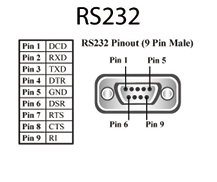
| Pin | Signal |
|---|---|
| Pin 1 | DCD |
| Pin 2 | RXD |
| Pin 3 | TXD |
| Pin 4 | DTR |
| Pin 5 | GND |
| Pin 6 | DSR |
| Pin 7 | RTS |
| Pin 8 | CTS |
| Pin 9 | RI |
US-313 RS-422/485 Pinout
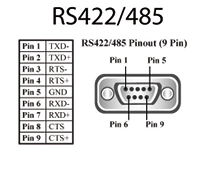
| Pin | Signal |
|---|---|
| Pin 1 | TXD- |
| Pin 2 | TXD+ |
| Pin 3 | RTS- |
| Pin 4 | RTS+ |
| Pin 5 | GND |
| Pin 6 | RXD- |
| Pin 7 | RXD+ |
| Pin 8 | CTS- |
| Pin 9 | CTS+ |