 BB Eco
One app for every Brainboxes device
Discover, monitor, configure, and upgrade every BB, ED, ES, and SW device from a single cross-platform desktop app.
BB-Eco is in public beta. Features and download URLs may change before the 1.0 release. Use it on production networks at your own discretion, and please share feedback.
BB-Eco is a single desktop app and command-line tool for discovering, monitoring, configuring, and upgrading every Brainboxes networked device from one place — across Windows, macOS, and Linux.
What BB-Eco does
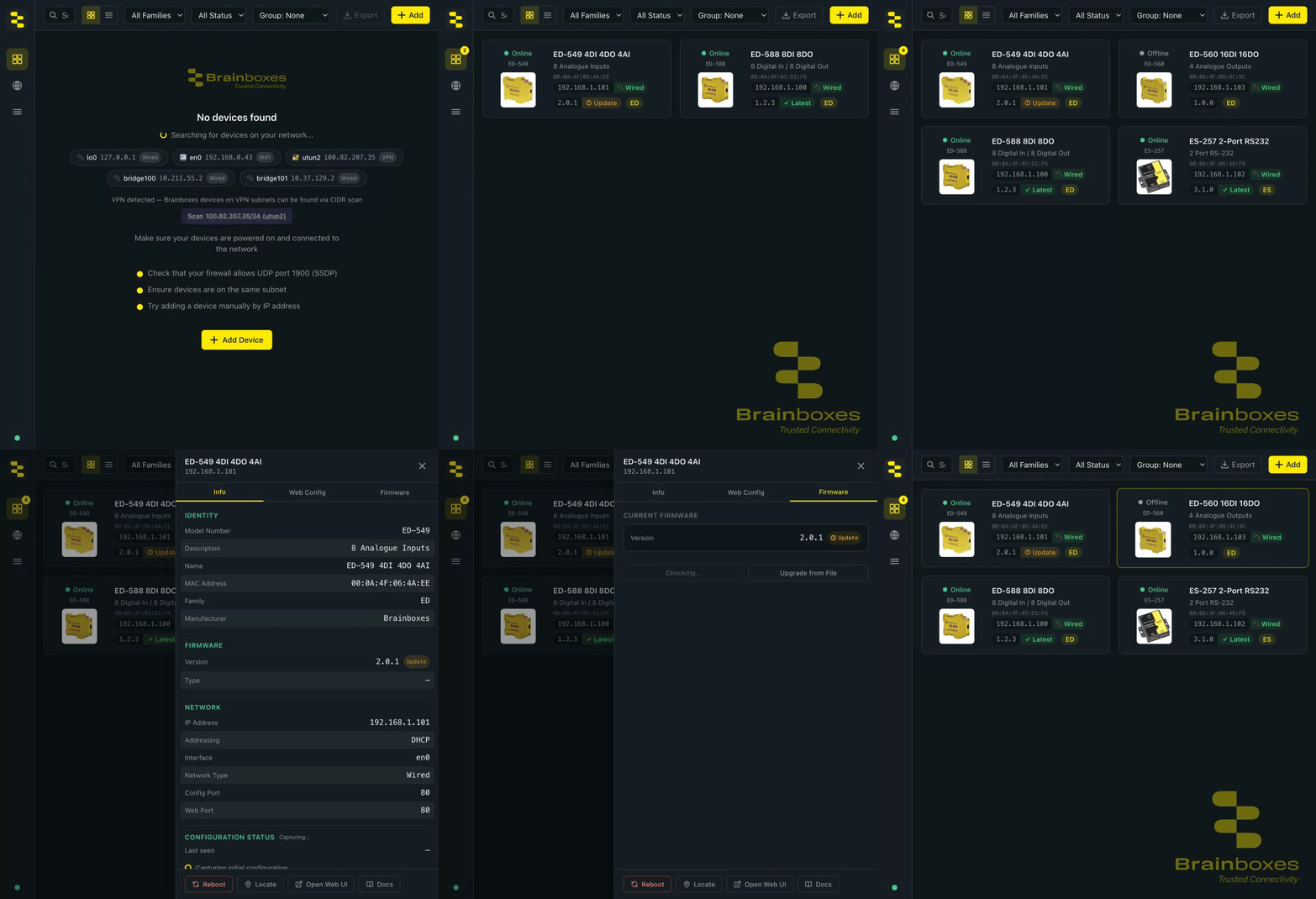
Four capabilities carry the product. Each has a fifteen-minute tutorial here, and deeper how-to, reference, and explanation articles across the site.
1. Find every device on your network
Open the app and your Brainboxes devices appear — no button to press. SSDP/UPnP auto-discovery covers ED, ES, BB, and managed SW devices on the local network; manual IP entry and a CIDR subnet scanner cover everything discovery broadcasts can't reach, including devices across a VPN.
Start here: Discover your first device · Go deeper: use BB-Eco as a network discovery tool, discovery over VPN and the device cache, when nothing appears
2. Upgrade firmware safely
One click from the orange Update pill to new firmware — with pre-flight compatibility and connectivity checks before a single byte is sent, live stage-by-stage progress, and automatic detection and recovery of devices stuck mid-upgrade (ED and ES).

Start here: Upgrade your first device · Go deeper: bulk-upgrade a whole site, recover a stuck device
3. Configure devices — and keep the config in a file
Read and change any setting from the app or the bb-eco config CLI, then export the whole configuration as a JSON template: reviewable in Git, validated offline, and appliable to one device or a hundred. Null means "don't touch", so a template governs exactly what you choose.
Start here: Configure your first device · Go deeper: template JSON format, downloadable ED/ES reference templates, configuration as code
4. Catch configuration drift
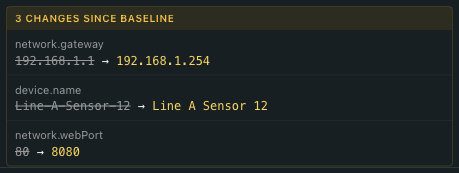
BB-Eco baselines every device it manages and flags the moment a live setting diverges — struck-through baseline, arrow, live value, right in the detail panel. Revert with one template apply, or re-baseline when the change was deliberate.
Start here: Track configuration drift · Go deeper: fleet-wide drift audits
What it replaces
If you've used Boost.IO for ED devices, Boost.LAN for ES devices, or per-device web configuration for BB and SW, BB-Eco brings all of that under one roof:
| Task | Before | With BB-Eco |
|---|---|---|
| Find devices on a subnet | Boost.IO (ED), Boost.LAN (ES), or per-device manual entry — all Windows-only | Auto-discovery on Windows, macOS, and Linux |
| Configure a device | Per-device web UI, one at a time | Embedded web UI plus reusable config templates |
| Upgrade firmware | Boost.IO (ED), Boost.LAN (ES), or per-device CGI tools | Single click, with preflight safety checks |
| Bulk operations across many devices | Manual, one device at a time | Update all for firmware; scripted template apply for configuration |
| Install Windows virtual COM ports for ES and ED | Boost.LAN (ES), Boost.IO (ED) | Coming after the 1.0 release — keep using Boost.LAN / Boost.IO for now |
Supported device families
| Family | Discovery | Configure | Upgrade |
|---|---|---|---|
| ED Ethernet Remote I/O | ✓ SSDP / UPnP | ✓ Web UI + templates | ✓ BOOTP/TFTP |
| ES Ethernet-to-Serial | ✓ SSDP / UPnP | ✓ Web UI + templates | ✓ BOOTP/TFTP |
| BB Industrial Edge Controllers | ✓ SSDP / UPnP and mDNS | ✓ Web UI | Coming soon |
| SW Industrial Ethernet Switches | ✓ SSDP / UPnP (managed models) | Coming soon | Coming soon |
Tutorials
Five articles take you from no software installed to a version-controlled device fleet, one capability at a time.
- Install BB-Eco — desktop app installer for Windows (macOS / Linux coming soon), plus the standalone CLI for scripts and headless servers
- Discover your first device — plug in a device and watch it appear in the dashboard, or run
bb-eco discoverfrom the terminal - Upgrade your first device — apply the latest firmware safely (desktop or
bb-eco upgrade) - Configure your first device — read and change settings, then save the configuration as a template file
- Track configuration drift — let BB-Eco flag any device that diverges from its baseline
How-to guides
Recipes for everyday workflows once the basics are in place.
Firmware
- Bulk-upgrade firmware across many devices — one workflow, dozens of devices
- Recover a device stuck in bootloader — for ED and ES devices that didn't complete an upgrade
Configuration
- Detect configuration drift across your fleet — audit live devices against your templates
Installation and offline use
- Migrate from Boost.IO and Boost.LAN to BB-Eco — what changes, what doesn't, and how to run them side-by-side during the transition
- Upgrade the BB-Eco app — switch between stable and beta channels, force an update check, roll back
- Run BB-Eco without internet access — air-gapped factory floors and Cyber Essentials admin accounts
Discovery and troubleshooting
- Use BB-Eco as a network discovery tool — see every device on the LAN, not just Brainboxes
- Site survey: inventory a Brainboxes deployment — turn an unfamiliar site into a complete asset inventory in fifteen minutes
- General troubleshooting with BB-Eco — read logs, copy lines, email support
- BB-Eco finds no devices on my network — layered checklist for discovery problems
- BB-Eco firewall rules for IT administrators — Defender rules, GPO/Intune deployment, Windows Server
Reference
- BB-Eco CLI reference — every command, subcommand, and option, auto-generated from the live CLI
- BB-Eco template JSON format — the file format for
bb-eco template export/apply/diff
Explanation
- Why BB-Eco exists — the four-tool problem and what unified cross-platform management changes
- How BB-Eco works — the desktop-app + sidecar architecture and the protocols on the wire
- Configuration as code with BB-Eco — declarative JSON templates, version control, drift detection
- Discovery, the device cache, and VPN sessions — administer remote sites over a VPN; cached devices auto-reconnect on the next session
What a typical device card looks like
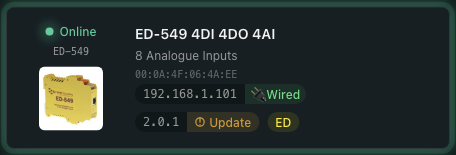
Every Brainboxes device on your LAN gets a card like this — model and description, network identity (MAC + IP + interface type), current firmware version, and a one-glance call-out (the Update pill) when newer firmware is on the channel. Click the card and the detail panel slides in with the full Info / Web Config / Firmware tabs.
Why BB-Eco
- One tool, every family. Stop switching between Boost.IO Manager (ED), Boost.LAN (ES), per-device web UIs, and family-specific recovery tools.
- Cross-platform. Native installers for Windows, macOS (Apple Silicon), and Linux — engineering laptops are no longer Windows-only.
- Safe firmware upgrades. Pre-flight compatibility checks, network connectivity validation, and a separate transfer process prevent the most common upgrade mistakes — with no administrator prompt on Windows or macOS.
- Built for scale. Bulk operations across hundreds of devices, configuration-as-code templates, and a scriptable CLI for CI pipelines and air-gapped sites.
Where it fits in your toolbox
BB-Eco is a device management application — it sits between you and your hardware. For developers integrating Brainboxes devices into their own software, the Brainboxes.IO .NET API and the Python, Java, and Node-RED SDKs remain the right place to start.
Get involved
The beta is open and we want your feedback. Hit a bug, missed a device, want a feature? Contact us — every report shapes the 1.0 release.