
Discovery, the device cache, and VPN sessions
BB-Eco's auto-discovery uses multicast protocols — SSDP and mDNS — that don't cross routers and that most corporate VPN clients deliberately block. So when you connect to a remote site over a VPN, the dashboard looks empty even though the devices are perfectly reachable over the tunnel.
There's a small piece of machinery inside BB-Eco that fixes this without you having to think about it: a persistent device cache and a ghost-promoter that brings cached devices back online whenever they're reachable. This page explains how it works and why a one-time CIDR scan is enough to give you a remembered fleet that "just shows up" every time you connect.
If you're trying to do this rather than understand it, jump to Use BB-Eco as a network discovery tool for the action steps.
The problem: multicast doesn't traverse VPNs
SSDP broadcasts to 239.255.255.250:1900; mDNS to 224.0.0.251:5353. To hear devices announcing themselves on the far side of a VPN tunnel:
- The VPN client would need to forward multicast traffic — most don't.
- The VPN gateway and intermediate routers would need to forward multicast — most don't.
- The far-side network would need IGMP snooping disabled or properly configured — rarely true in OT networks.
In practice you can assume VPN = no multicast. The same applies to any cross-subnet routing scenario.
What does work over VPN is direct unicast IP traffic — TCP probes, HTTP requests, ping. If you can curl http://10.50.0.50/ from your laptop, BB-Eco can reach the same device. The mechanism below is built around that.
The mechanism: cache + ghost-promoter
When BB-Eco identifies a Brainboxes device — whether through SSDP, mDNS, the manual Add device dialog, or a CIDR scan — it captures the device's identity and configuration into a local template cache. Each entry is keyed by MAC address and stored as a JSON file:
| OS | Cache path |
|---|---|
| macOS | ~/Library/Caches/bb-eco/templates/ |
| Linux | ~/.cache/bb-eco/templates/ |
| Windows | %LOCALAPPDATA%\bb-eco\templates\ |
The cache persists across launches. You don't manage it manually — it's populated as a side-effect of every discovery, and it's the same cache that holds the configuration baseline for drift detection.
On every BB-Eco launch, a background process called the ghost-promoter runs:
- Wait ~1.5 seconds — give SSDP and mDNS a head-start to discover anything reachable via multicast.
- Enumerate every MAC in the template cache that didn't show up via multicast.
- For each cached device, HTTP-probe its last-known IP at the device's known web port, then fall back to 80, 5001, and 9000.
- Cross-check the responding device's MAC against the cached MAC.
- On a clean match, bring the device into the live dashboard alongside its current state, current firmware version, and any drift against its template.
That step 4 is what makes the mechanism safe. If DHCP has handed the cached IP to a different device since you last saw it, BB-Eco won't be fooled — the MAC mismatch fails the probe silently, the cached entry stays exactly as it was, and the device shows offline until the next CIDR scan finds its new address.
Putting it together: the VPN session loop
Day one, working from the office:
-
Connect to the corporate VPN. The factory subnet is reachable over the tunnel.
-
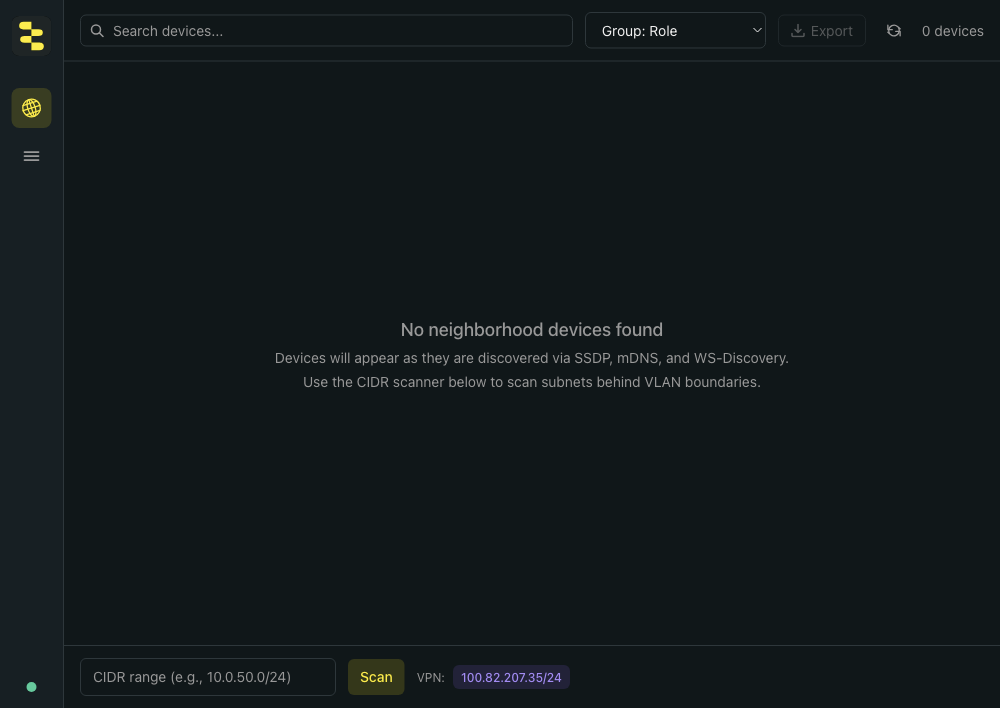
Open BB-Eco. Multicast finds nothing — the dashboard looks empty.
-
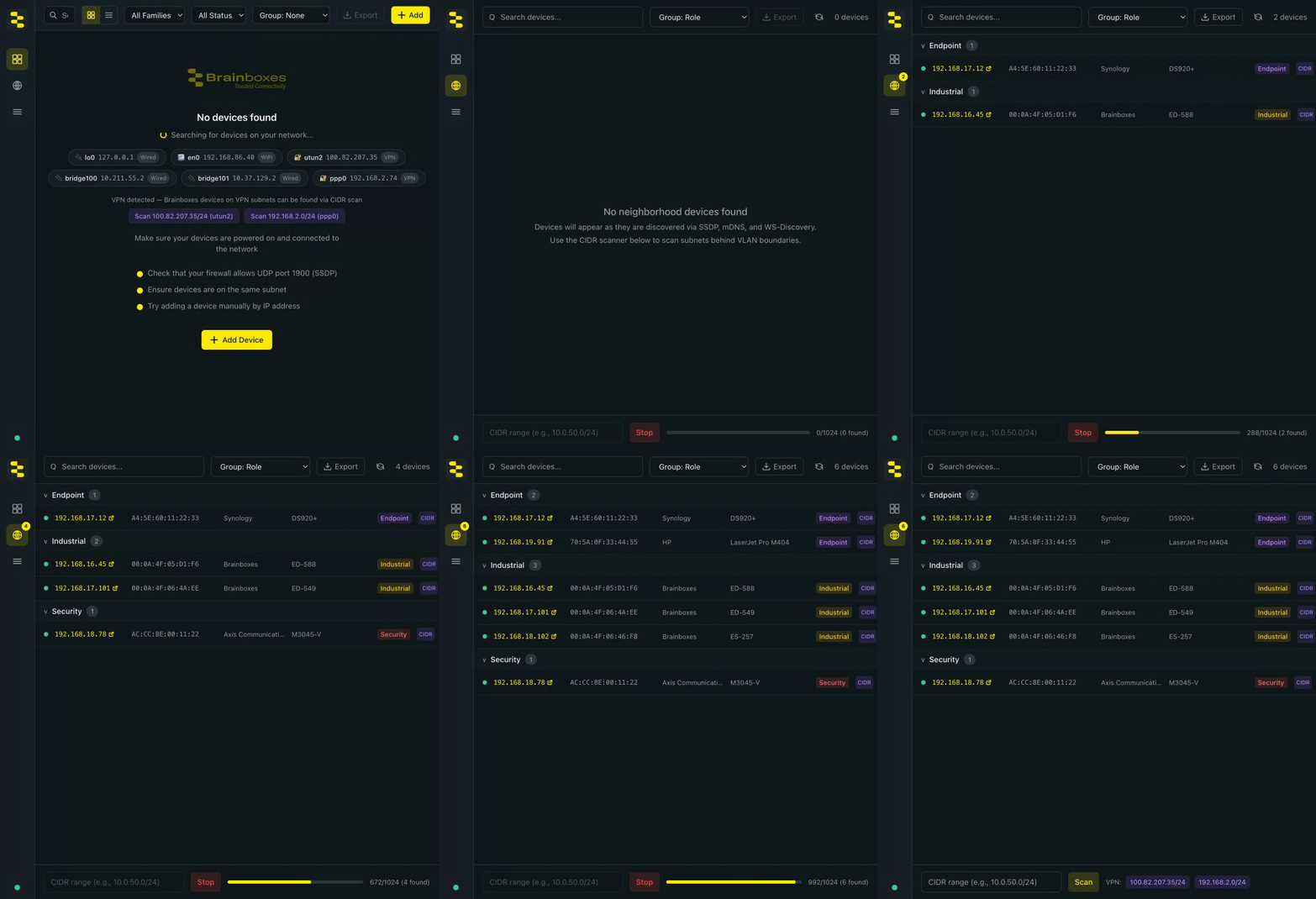
Click the VPN suggestion at the bottom of the Network Neighborhood tab — or type the factory's CIDR by hand, or use the CLI:
bb-eco scan 10.50.0.0/24. -
BB-Eco TCP-probes the range, identifies the Brainboxes devices, and populates both the Network Neighborhood list and the main Devices dashboard. Each discovered device gets a template-cache entry.
Day two, same workflow:
- Connect to the VPN.
- Open BB-Eco. Multicast finds nothing (still — VPN didn't suddenly start carrying multicast).
- The ghost-promoter runs through the cache, HTTP-probes the factory's IPs, and the devices come back online within a couple of seconds without you doing anything.
That's the cache-and-reload story: scan once, remembered forever (or until DHCP churns the IP, in which case a fresh scan over the same VPN updates the cache).
What the VPN suggestion is
The empty-state Neighborhood tab surfaces detected VPN tunnels as one-click CIDR-scan buttons — Day 1 of the loop above is two clicks rather than typing a subnet by hand:

The "VPN: …/24" badge at the bottom of the Network Neighborhood tab is a one-click shortcut. BB-Eco enumerates the host's network interfaces, picks out the ones the OS reports as VPN, computes a /24 from the assigned IP, and offers it as a clickable suggestion. Clicking it kicks off a CIDR scan of that subnet — saving you the trouble of remembering or typing the range.
The suggestion only appears when there's an active VPN tunnel detected on the host. No tunnel, no badge.
Limitations and gotchas
- You need network reachability — the VPN routing table has to actually carry traffic to the device subnet.
pingorcurlto a known device IP confirms this. - Split-tunnel configurations — corporate VPNs often route only specific subnets through the tunnel. Confirm the OT subnet is in the route table (
route -non Linux/macOS,route printon Windows). - DHCP churn — covered above; the safety check stops BB-Eco trusting a wrong device, but it does mean a churned address shows offline until you re-scan.
- Firmware upgrades don't work over a routed VPN — the device's bootloader finds BB-Eco with BOOTP broadcasts, which don't cross the tunnel, and the pre-flight check warns when the device sits behind a VPN interface. Use VPN sessions for inspection, configuration changes and template diffs; upgrade from a machine on the device's own LAN.
Where to go next
- Use BB-Eco as a network discovery tool — the action-focused how-to for CIDR scanning
- Detect configuration drift with BB-Eco — the same template cache also drives drift detection
- Run BB-Eco without internet access — different scenario: no internet (vs. no multicast)
- How BB-Eco works — the full architecture context