
Configuration as code with BB-Eco
BB-Eco lets you treat Brainboxes device configuration the same way modern teams treat infrastructure: as declarative files in version control, applied through tooling, rather than clicked into web UIs and remembered (or forgotten) by individuals.
This page explains what config as code means in BB-Eco, why you'd use it, and how the pieces fit together. It deliberately stays at the concept level — for the file format see the template format reference, and for hands-on tasks see the how-to guides on exporting, applying, and detecting drift.
What "config as code" means
A traditional Brainboxes deployment looks like this: an engineer opens each device's web UI, fills in network and protocol settings, repeats for the next device. The configuration lives in the device's flash and in the engineer's head.
The config-as-code version looks like this:
- The engineer configures one device perfectly, using the web UI.
- They export the live configuration to a JSON template file.
- The template is checked into Git alongside the rest of the site's infrastructure code.
- New devices arrive — the engineer applies the template to each one with a single command, or from the device's Info tab in the app.
- Periodically, the team diffs every live device against its template to catch drift — settings that someone changed by hand and forgot to re-template.
The same principle drives Terraform, Ansible, Kubernetes manifests, and Docker Compose files. BB-Eco brings it to Brainboxes ED Ethernet I/O and ES Ethernet-to-Serial gateways.
Why use it
- Repeatable deployments. Configure one device, apply to the rest. Every unit gets the exact same settings, every time.
- Drift detection. Compare live devices against your templates and flag anything that's changed. Catch misconfigurations before they cause downtime.
- Audit trail. Git history shows who changed what config, when, and why. Pull request reviews catch mistakes before they hit a device.
- Disaster recovery. Keep templates with your deployment scripts. If a device dies, replace the hardware, apply the template, you're back online.
- Scale. Apply the same template across 10, 50, or 100 devices with one scripted loop.
What drift looks like in the UI
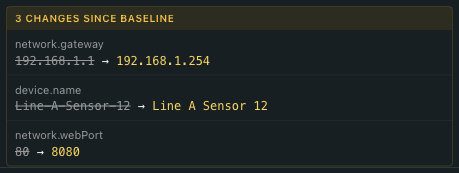
When a live device diverges from its captured template, the Info tab renders the affected fields inline — struck-through baseline on the left, amber actual value on the right:

The Configuration Status section at the bottom of the Info tab summarises how many fields drifted and how stale the baseline is:
How BB-Eco implements it
The four primitives, all available from both the desktop app and the bb-eco CLI:
| Primitive | What it does | CLI command |
|---|---|---|
| Export | Read a device's live configuration, write it as a JSON template | bb-eco template export <device> <file> |
| Apply | Push a template to a device, with a dry-run preview | bb-eco template apply <device> <file> |
| Diff | Compare a device's current config against a template, report differences | bb-eco template diff <device> <file> |
| Validate | Check a template file is well-formed JSON with a supported schema version | bb-eco template validate <file> |
Each primitive maps onto a clear use case. Export to capture a known-good baseline. Apply to bring a new device into compliance. Diff in CI to catch configuration drift across the fleet. Validate in a pre-commit hook to stop broken templates landing in main.
The "null means don't touch" rule
A template's sections and fields are all optional. If a section is missing, or a field is null, BB-Eco leaves that setting untouched on the target device. This single rule unlocks several patterns:
- Focused templates — a template that only sets the serial port baud rate won't change the device name, network settings, or anything else
- Site-specific overrides — keep a base template, layer site-specific values (gateway IP, NTP server) on top using standard JSON tooling like
jq - Safer rollouts — apply a known-good template across a fleet without worrying about overwriting site-specific tweaks that aren't in the template
The default export deliberately strips device-specific values (MAC, IP, firmware version) so that one device's exported template is genuinely a template, not a clone.
What templates do not cover (yet)
- BB-400 Industrial Edge Controllers — the BB family runs Linux, and its configuration story is broader than the ED/ES protocol-settings model. BB support is on the roadmap but not in the beta.
- Managed SW switches — same status: discovery is in BB-Eco today, but configuration templates for switch-specific settings (VLANs, port mirroring) are post-1.0 work.
- Device-by-device passwords — security settings are excluded from exports by default, and passwords are never written to a template even when you opt the security section in. A template can carry a password you type into it by hand, but BB-Eco will not put one into a JSON file that might end up in version control.
Where to go next
- Configure your first device — hands-on tutorial: read, change, export, apply
- Track configuration drift on your devices — hands-on tutorial for the drift half of the story
- BB-Eco template format reference — the full JSON schema, plus downloadable ED/ES reference templates with every key, default, and range
- Detect configuration drift with BB-Eco — fleet-scale drift workflow
- BB-Eco CLI reference — every
templatesubcommand and option, with real output - How BB-Eco works — the architecture context for why templates work the way they do