
Detect configuration drift across your Brainboxes fleet with BB-Eco
When a device's live configuration diverges from the template you provisioned it with, that's drift. A site engineer fixed a baud rate by hand and didn't update the template. A new firmware default reset something. Someone clicked through the web UI looking for a setting and accidentally saved a change. Drift is normal — undetected drift is the problem.
This how-to walks through using BB-Eco to detect drift, decide what to do about it, and bring devices back into compliance with their templates — at fleet scale. If you're auditing a single device for the first time, start with the shorter tutorial Track configuration drift on your devices.
For the bigger-picture rationale see Configuration as code with BB-Eco. For the JSON template format see the template format reference.
Before you start
- BB-Eco is installed (see Install BB-Eco).
- You have at least one template file for each device family or model you want to audit. If you don't, see Step 0 below.
- The devices you want to audit are online in BB-Eco.
Step 0 — Get a baseline template
Drift detection compares a live device against a template. If you don't have a template yet, start by capturing one from a known-good device:
# CLI
bb-eco template export 192.168.1.50 templates/ed-588-baseline.json
Or in the desktop app: open the device's detail panel → Info tab → scroll to Configuration Status → Download Template.
Commit the resulting JSON to Git alongside the rest of your deployment infrastructure. That commit is now your reference point.
Step 1 — Diff a single device
The fastest way to spot drift on one device is bb-eco template diff:
bb-eco template diff 192.168.1.50 templates/ed-588-baseline.json
A compliant device prints one line — Device is compliant — 32 field(s) match template. — and exits 0. A drifted device prints a table with one row per differing field (section, key, template value, live value) and a DRIFTED: N field(s) differ summary. Fields the template leaves null or omits are never listed — the template explicitly doesn't care about them.
For machine-readable output, add --json:
bb-eco template diff 192.168.1.50 templates/ed-588-baseline.json --json | jq '.differences'
The JSON carries a differences array and a matches array; each entry has section, key, templateValue and actualValue keys — easy to feed into a Slack notifier, an email digest, or a CI failure summary.
Step 2 — Diff the dashboard at a glance
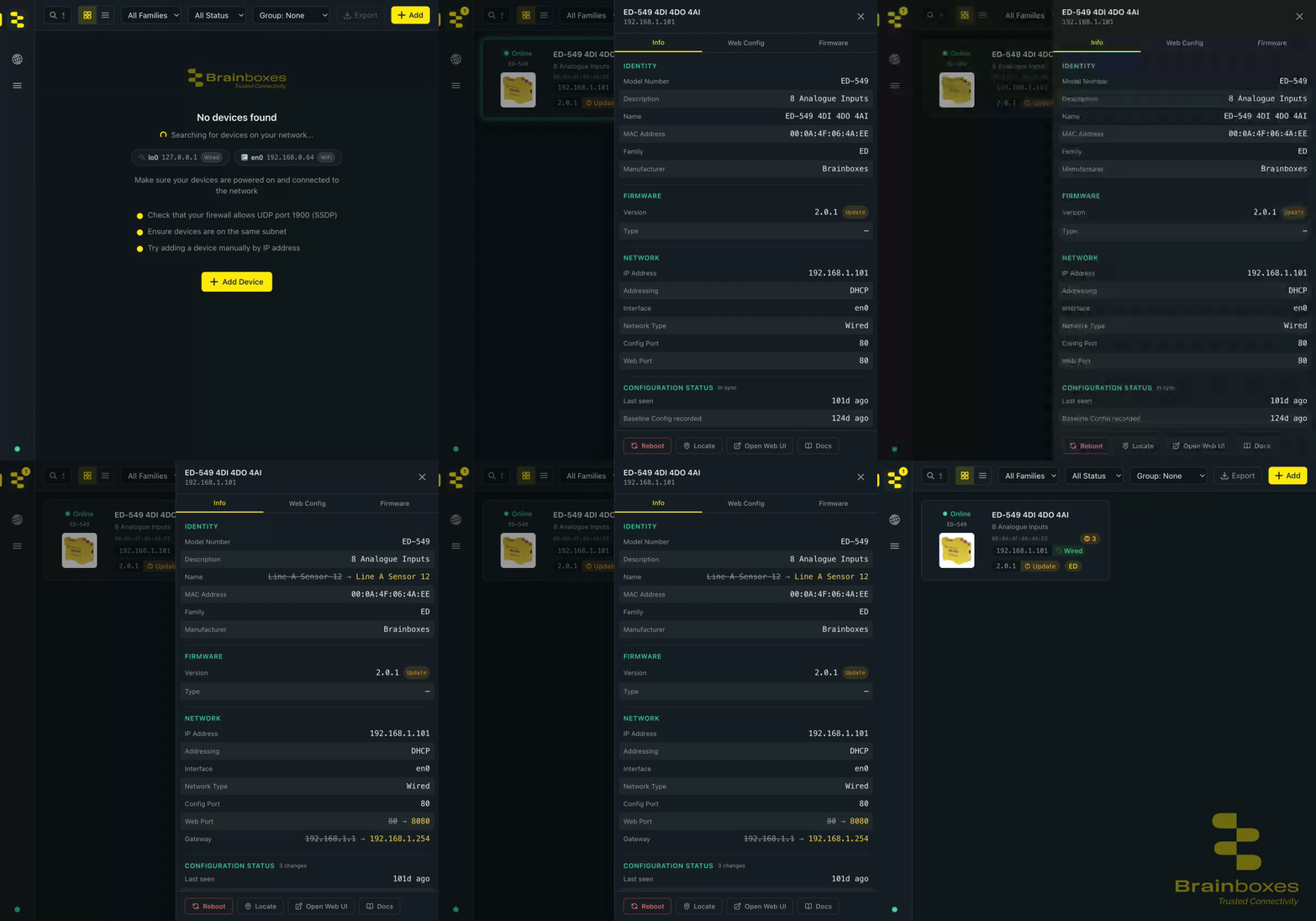
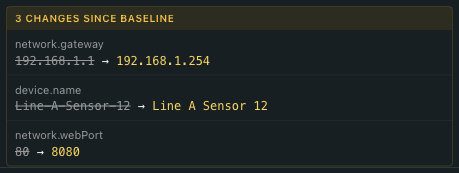
The desktop app surfaces drift visually. Open the device's detail panel — drifted fields render inline with a struck-through baseline value followed by an amber arrow and the live value, so you see exactly what changed without running a CLI command.
A single drifted row reads like this — left of the arrow is the captured baseline (struck through, indicating "this is no longer what's deployed"); right of the arrow is the live value pulled from the device:

The Configuration Status pill at the bottom of the Info tab summarises the count and timestamps:
The dashboard also shows a small drift indicator on each device card whose live config has diverged from its captured baseline, so you can scan the whole fleet at a glance.
Step 3 — Run drift detection across many devices
For a site-wide audit, run bb-eco template diff in a loop and aggregate the results. A simple Bash example:
#!/usr/bin/env bash
set -euo pipefail

TEMPLATE="templates/ed-588-baseline.json"
DEVICES=(192.168.1.50 192.168.1.51 192.168.1.52 192.168.1.53)

for ip in "${DEVICES[@]}"; do
  diff_count=$(bb-eco template diff "$ip" "$TEMPLATE" --json | jq '.differences | length')
  if [ "$diff_count" -gt 0 ]; then
    echo "DRIFT: $ip has $diff_count fields out of compliance"
  fi
done
This pattern fits straight into a CI pipeline (GitHub Actions, GitLab CI, Jenkins) or a scheduled cron / systemd timer. Fail the job, post to Slack, raise a Jira ticket — whatever your team's escalation looks like.
Step 4 — Decide: revert or re-baseline
When BB-Eco flags drift, you have three options:
| Option | Use when | How |
|---|---|---|
| Revert | The change was unintentional. The template is the source of truth. | bb-eco template apply <ip> <template> to push the template back over the device. Use --dry-run first. |
| Re-baseline | The change was deliberate and should be the new standard for the whole fleet | Re-export the template from the now-modified device (Refresh baseline on the Info tab updates the app's own baseline too), commit the diff to Git, apply to every other device. |
| Add an exception | The change is legitimate for this one device only (e.g. a site-specific gateway) | Create a per-device template variant with the override layered on top — see Step 5. |
In practice most drift is option 1 (someone fiddled, no harm done, push it back) or option 2 (a real change to the spec, propagate it). Option 3 is useful but rare.
Step 5 — Layer site-specific overrides
Templates are plain JSON. The simplest way to make a site-specific variant is to copy the base template and edit one or two fields by hand:
cp templates/ed-588-baseline.json templates/sites/factory-floor-a.json
# Edit the copy in your editor and change `network.gateway` to `10.0.0.1`
If you script template generation in CI, the same edit is one line of jq:
jq '.network.gateway = "10.0.0.1"' templates/ed-588-baseline.json > templates/sites/factory-floor-a.json
Either way, factory-floor-a.json matches the baseline in every field except network.gateway. Drift detection on devices in that site uses the variant; the rest of the fleet uses the baseline.
Common gotchas
nullin the template means "don't care" — fields you didn't include in the template aren't drift candidates. If you want a field to be audited, it must be in the template with a non-null value.- Identity fields aren't compared — MAC, IP and current firmware version are not part of an exported template, and an
identitysection you add by hand is ignored by diff and apply. - Passwords are excluded by default — drift detection on credentials only works if you explicitly exported with
--include-security. This is intentional — most teams don't want passwords in JSON files in Git. - Templates are family-locked — an ED template can't apply to or diff against an ES device, and vice versa. Use
compatibleModelsin the envelope if you need to scope a template even more narrowly.
More resources
- Track configuration drift on your devices — the single-device tutorial version of this workflow
- Configure your first device — where baseline templates come from
- Configuration as code with BB-Eco — the bigger picture
- BB-Eco template format reference — every field and its type, plus downloadable ED/ES reference templates
bb-eco template diffCLI reference — synopsis and optionsbb-eco template applyCLI reference — for the revert step- Bulk-upgrade firmware with BB-Eco — same fleet-scale pattern, applied to firmware