
ED Modbus TCP Configuration
Accessing the Web Interface
Brainboxes ED products by default are configured to use the ASCII protocol. To enable the Modbus protocol instead, you must access the webpage for your device.
The webpage for Brainboxes Ethernet I/O products can be accessed by entering the IP address of the device into the URL bar in your web browser:

To directly access the protocol page for quick Modbus configuration, enter the following in the URL bar:
192.168.0.62/#/protocol
The IP address listed here is purely an example. You will need to enter the IP address of your device, which may have been:
- Set automatically by a DHCP server on your network
- The factory default address of
192.168.127.254 - Previously set by you via the device webpage to a preferred value
Configuration Options
Once you have accessed the Modbus protocol page for your device, you will have the option to configure the following settings:
| Setting | Default Value | Description |
|---|---|---|
| TCP Port | 502 | The port number used for Modbus TCP connections |
| Idle Timeout | 0 | Seconds before an idle connection is closed |
| Max Connections | 8 | Maximum simultaneous connections allowed |
Ensure that the Current Protocol drop down is set to Modbus TCP and not ASCII mode.
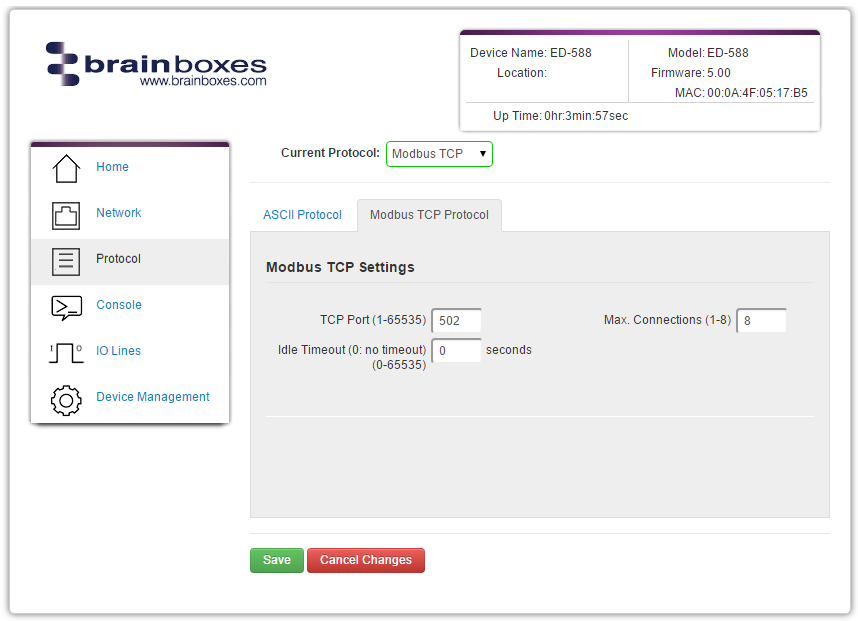
TCP Port
The TCP port is a 16-bit number (1-65535) used to identify the services or processes being used in networking communications. Specific port numbers are often used to identify specific services. By convention, TCP port 502 is used by the Modbus protocol.
Idle Timeout
When the Idle Timeout is set, if there is no communication to the device for the specified period of time (in seconds), the connection will be closed. The default idle connection is 0, meaning the connection will never be dropped automatically.
Max Connections
The Max Connections field allows you to select the maximum number of simultaneous connections which can be made to your ED device at any one time. This field accepts values between 1 (minimum) and 8 (maximum).