
Why BB-Eco exists
Brainboxes hardware spans four families — ED Ethernet I/O, ES Ethernet-to-Serial, BB Industrial Edge Controllers, and SW Industrial Switches — and until BB-Eco there was no single way to manage them. This page covers the problem we set out to solve and how the unified approach changes a deployment day.
The problem with one tool per family
Before BB-Eco, an engineer commissioning a mixed-family Brainboxes site juggled at least four tools:
- Boost.IO — Windows-only, ED-focused. Discovery and firmware upgrades for Ethernet Remote I/O, plus Windows virtual COM port installation for the serial channels on analogue ED devices.
- Boost.LAN — Windows-only, ES-focused. Discovery, firmware upgrades, and installation of Windows virtual COM ports for Ethernet-to-Serial gateways.
- Per-device web UIs — every BB-400 controller, every managed SW switch, and most ED and ES devices ship their own embedded web interface, accessed by typing the device's IP into a browser. Useful for one-off changes; painful for a fleet.
- Family-specific CLIs and scripts — ad-hoc helpers for batch operations that didn't exist in the GUI tools.
Three concrete consequences:
- Windows-only deployment laptops. Neither Boost.IO nor Boost.LAN runs on macOS or Linux. Every Brainboxes site engineer needed a Windows machine, even when the rest of the team had standardised on something else.
- No bulk operations across families. Upgrading 40 mixed ED and ES devices meant 40 sequential trips through different tools, with no shared progress display or audit trail.
- Configuration was a one-way street. The web UIs let you change settings on a single device, but there was no way to capture a known-good configuration as a template, apply it to fresh hardware, or detect when a device had drifted from its baseline.
What BB-Eco changes
The dashboard surface every family lands in is the same — once a device announces itself on the LAN, it gets a card with the same shape regardless of whether it's ED, ES, BB, or SW:
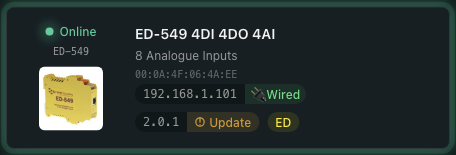
BB-Eco is a single desktop app and command-line tool that covers every device family from the same dashboard:
- Cross-platform. Windows, macOS (Apple Silicon), and Linux installers. Engineers use whatever laptop their team standardises on.
- One discovery surface. ED, ES, BB, and managed SW devices all show up in the same grid as soon as they appear on the network — no protocol-switching, no per-tool device list to maintain.
- Bulk by default. Update all brings every out-of-date device on the network to the current firmware in one sequential batch, with live progress and a per-device report; the CLI does the same for firmware and loops templates across a fleet.
- Configuration as code. Capture a working device's configuration as a JSON template. Apply it to fresh hardware. Detect drift across the fleet. Edit templates in your editor of choice and check them into version control.
- Scriptable. The same operations the GUI exposes are available from the
bb-ecocommand-line tool — for CI pipelines, scheduled audits, and air-gapped deployments where a desktop session isn't appropriate.
What BB-Eco isn't (yet)
It isn't a replacement for the Brainboxes.IO .NET API or the Python, Java, and Node-RED SDKs — those exist to embed Brainboxes devices into your own software. BB-Eco is the management layer: discovery, configuration, monitoring, and firmware. If you're writing an industrial control application that reads digital inputs from an ED-588, you want the SDK; if you're commissioning the device that the SDK will then talk to, you want BB-Eco.
It's also not yet a full replacement for the Windows virtual COM port installation that ships with Boost.LAN (for ES gateways) and Boost.IO (for the serial channels on analogue ED devices). Both ranges expose serial ports that Windows applications expect to see as COM3, COM4, etc. — and the kernel driver that maps a remote port to a local COM number ships with the legacy tools today. The driver and IO/LAN logic are mostly the same across both, so bringing this capability into BB-Eco for ES and ED at the same time is on the roadmap for a release after 1.0; until then, install BB-Eco for everything except COM port mapping, and keep Boost.LAN / Boost.IO around for that one job on Windows machines that need it.
What's next
- How BB-Eco works — the architecture under the hood
- Install BB-Eco — get the beta running on your machine
- Discover your first device — five-minute walkthrough