
Migrate from Boost.IO Manager and Boost.LAN to BB-Eco
If you've been managing Brainboxes devices with Boost.IO Manager (for ED Ethernet I/O), Boost.LAN (for ES Ethernet-to-Serial), or per-device web UIs, BB-Eco brings all of that under one roof — and adds macOS and Linux support that the legacy tools never had.
This guide is for engineers planning the switch. It covers what BB-Eco replaces today, what's still better handled by the legacy tools, and how to run both side-by-side while you migrate.
Tool-by-tool feature parity
| Job | Boost.IO Manager | Boost.LAN | BB-Eco today | Notes |
|---|---|---|---|---|
| Discover ED devices on the LAN | ✓ | — | ✓ | BB-Eco runs on macOS and Linux too |
| Discover ES devices on the LAN | — | ✓ | ✓ | BB-Eco runs on macOS and Linux too |
| Open the device's web UI | ✓ | ✓ | ✓ | BB-Eco embeds the web UI in a tab; no external browser hop |
| Upgrade ED firmware | ✓ | — | ✓ | Same BOOTP/TFTP protocol, plus a pre-flight compatibility check |
| Upgrade ES firmware | — | ✓ | ✓ | Same protocol; ES-313 / ES-522 / ES-279 supported |
| Bulk operations across many devices | — | — | ✓ | Update all in the app or bb-eco upgrade all for firmware; loop bb-eco template apply for configuration |
| Configuration as code (JSON templates) | — | — | ✓ | New capability — see Configuration as code |
| Drift detection across a fleet | — | — | ✓ | New capability — see Detect configuration drift |
| Install Windows virtual COM ports for ES | — | ✓ | Not yet — keep using Boost.LAN | This is the one workflow that still needs the legacy tool |
| BB-400 Industrial Edge Controller management | — | — | ✓ | mDNS discovery + embedded web UI |
| Managed SW switch discovery | — | — | ✓ | SSDP and subnet scan; configuration and upgrade ship after 1.0 |
What you can stop using Boost.IO Manager / Boost.LAN for, today
If your workflow is one of the green-tick rows above, BB-Eco is a drop-in replacement. The most common cases:
- ED firmware upgrades — moves from Boost.IO Manager to BB-Eco. Same protocol on the wire, plus a pre-flight check that catches the most common bricking scenarios (wrong model or chip class, Wi-Fi link, VPN active).
- ES firmware upgrades — moves from Boost.LAN to BB-Eco. Same protocol; the upgrade flow is described in Upgrade your first device.
- Discovery and inventory — both tools' device-list views are replaced by BB-Eco's dashboard, plus a Network Neighborhood view for everything else on the LAN.
- Web configuration — both tools just open a browser to the device's web UI. BB-Eco does the same, but in an embedded tab so you don't lose context.
What you'll still need Boost.LAN for, during the beta
Windows virtual COM ports for ES devices. Boost.LAN is the only tool today that installs the kernel driver and creates virtual COM ports (COM4, COM7, etc.) so your Windows applications can talk to ES devices over a serial-style API. BB-Eco does not yet ship that driver. If your application needs virtual COM ports on Windows, keep Boost.LAN installed for that one job — everything else can move to BB-Eco.
This gap closes after BB-Eco's 1.0 release. We're keeping the scope of beta tight to ship something stable.
Running both side-by-side
You don't have to pick one. Both tools share the same underlying protocols and don't fight over devices, so you can:
- Install BB-Eco alongside Boost.IO Manager / Boost.LAN. The installers don't conflict. Reboot is not required.
- Run discovery in both at the same time. SSDP is broadcast-based; the device replies to whoever asks.
- Choose per-task which tool to use. Pick BB-Eco for daily work and reach for Boost.LAN only when you need the Windows virtual-COM workflow.
Don't start a firmware upgrade in BB-Eco and Boost.IO Manager (or Boost.LAN) on the same device at the same time — two tools answering the same bootloader means two sources of firmware blocks, which is exactly how a device ends up with a corrupt image. Pick one tool per upgrade window, and make sure no other machine on the segment is running an upgrade tool either.
Step-by-step migration
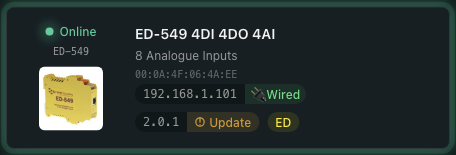
The Update pill on the BB-Eco device card is the cue that everything's working — once you can see your devices and identify which ones have firmware available, the migration's done; the rest is everyday workflow:
- Install BB-Eco. Pick the right installer for your OS — see Install BB-Eco. On Windows, the installer doesn't disturb your existing Boost.IO Manager or Boost.LAN installation.
- Open BB-Eco. Auto-discovery starts the moment the app opens. Within seconds your existing devices appear in the dashboard. No configuration to import — BB-Eco reads the same
devinfo.xmlfrom each device that the legacy tools do, so it gets the same picture. - Verify the inventory. Compare BB-Eco's device count against Boost.IO Manager / Boost.LAN. If something's missing, work through BB-Eco finds no devices on my network — the most common cause is a VPN client blocking SSDP broadcasts.
- Try a non-destructive operation first. Click a device card and explore the Info and Web Config tabs. Nothing on the device changes; you're just reading state.
- Run a firmware upgrade in BB-Eco when you have a maintenance window. Walk through Upgrade your first device — the pre-flight check shows you exactly what BB-Eco will do before it does anything.
- Capture configuration baselines. Once you trust the read path, export a template from each device (
bb-eco template export <ip> <file>). Commit the templates to Git. This is the entry point to configuration as code and drift detection — neither was possible with the legacy tools. - Decide whether to uninstall the legacy tools. Boost.IO Manager can usually be uninstalled once BB-Eco's running cleanly; Boost.LAN should stay if you need its Windows virtual COM ports.
Why migrate at all?
- Cross-platform. Engineering laptops are no longer Windows-only. macOS (Apple Silicon) and Linux installers exist for the same workflow your team has been doing.
- One tool, every device. Stop switching between Boost.IO Manager (ED), Boost.LAN (ES), and per-device web UIs.
- Configuration as code. Templates in Git, drift detection in CI, declarative provisioning for new devices. Not possible with the legacy tools at all.
- Scriptable CLI.
bb-eco discover --json | jqplugs straight into automation. No more "click through the GUI for each device." - Active development. BB-Eco is the platform forward. The legacy tools enter maintenance mode once 1.0 ships.
More resources
- Why BB-Eco exists — the four-tool problem and what unified cross-platform management changes
- Install BB-Eco — installer downloads for macOS, Windows, and Linux
- Discover your first device — get past the empty dashboard quickly
- Upgrade your first device — the safe firmware upgrade flow
- Legacy ED firmware upgrade with Boost.IO Manager — keep this bookmarked while you migrate
- Legacy ES firmware upgrade with Boost.LAN — same, for ES gateways