
BB-Eco finds no Brainboxes devices on my network — troubleshooting checklist
If BB-Eco's dashboard stays empty after launch and you know there are Brainboxes devices on your network, work through this checklist in order. The first three items account for the vast majority of cases.
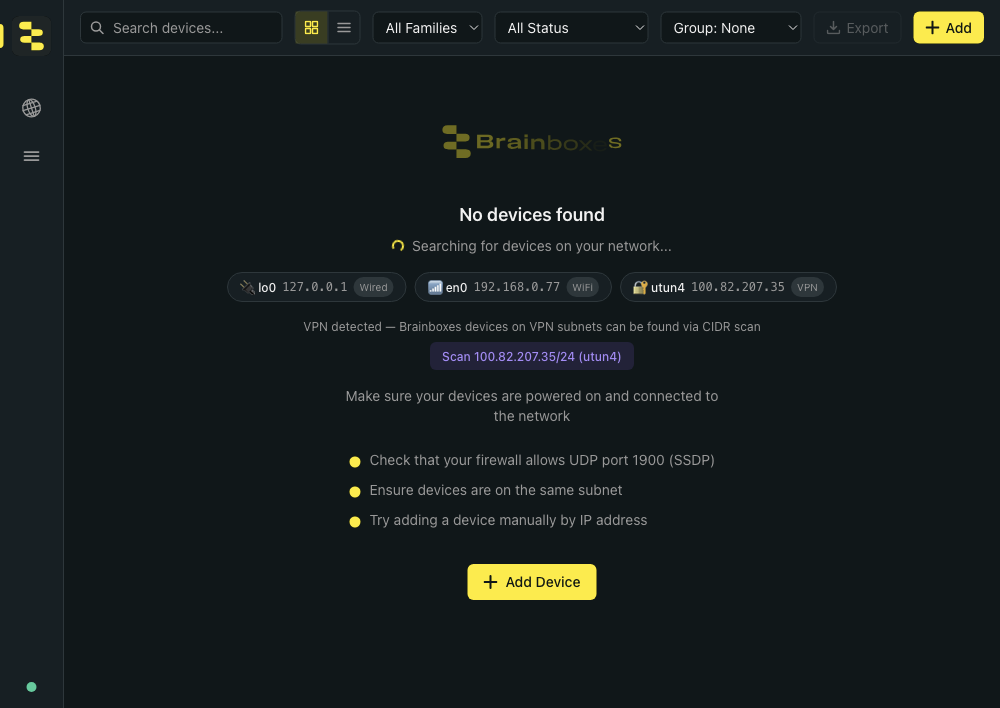
The empty-state panel itself is informative — it shows every network interface BB-Eco can see, calls out any VPN tunnels (with one-click CIDR-scan suggestions for those subnets), and reminds you of the three most common causes. If a VPN suggestion is showing, that's almost certainly the issue — see Step 3 below.
The interface chips row up close — each chip shows the OS interface name, IP, and a Wired / WiFi / VPN tag. If your Brainboxes devices are on a subnet that doesn't appear here, BB-Eco can't see them at the OS level (Step 2 below):

1. Confirm the device is powered and connected
- The device's power LED is on.
- The Ethernet activity LEDs flicker periodically.
- A direct ping from your computer to the device's IP succeeds.
If the device is unresponsive at the network level, the rest of this guide doesn't apply — start with the device's own quick start guide.
2. Confirm you're on the same Layer 2 broadcast domain
BB-Eco's auto-discovery uses SSDP (UPnP) for ED, ES, and managed SW devices, which relies on UDP multicast (239.255.255.250:1900). For BB-400 Industrial Edge Controllers it additionally listens on mDNS (224.0.0.251:5353), which sometimes survives where SSDP doesn't. Either way, multicast does not cross routers without explicit configuration, so BB-Eco only sees devices on the same broadcast domain — the same VLAN, the same physical switch.
| Setup | Discovery works? |
|---|---|
| Laptop and device on the same desk-side switch | Yes |
| Laptop and device on the same office VLAN | Yes |
| Laptop on Wi-Fi, device on wired Ethernet through different switch | Maybe — depends on the wireless access point bridging |
| Laptop on a different subnet (cross-VLAN) | No — use manual entry |
tcpdumpOn macOS or Linux, sudo tcpdump -n -i <iface> 'udp port 1900' should show SSDP traffic from your devices. No traffic on the wire means the broadcasts aren't reaching you — a switch or router config issue, not a BB-Eco issue.
3. Disable any VPN client
When BB-Eco detects an active VPN tunnel, the empty state surfaces a one-click CIDR-scan button for that subnet — useful when the VPN happens to be the only path to your devices (a remote site over a corporate tunnel). Click it to actively probe the VPN subnet rather than waiting on multicast, which the VPN almost certainly drops:

VPN clients commonly block LAN broadcasts when active, even when configured for "split tunnel" mode. Quick test: disconnect from the VPN, restart BB-Eco, and check whether devices appear.
If they do, you have two options for production work:
- Toggle the VPN off while using BB-Eco on the local network.
- Add devices manually by IP — manual entry uses unicast HTTP, which the VPN typically allows.
4. Allow BB-Eco through your firewall
 Windows Defender Firewall
The installer adds BB-Eco's firewall rule when you accept its one-off administrator prompt. If that was declined or the rule was removed since, BB-Eco shows an Add firewall rule banner — click it and accept the prompt. From a terminal, bb-eco firewall status explains the effective state and bb-eco firewall register (elevated) adds the CLI's own rule. On machines managed by Group Policy or Intune, see BB Eco firewall rules for IT administrators.
To check by hand: open Windows Security → Firewall & network protection → Allow an app through firewall, find Brainboxes BB Eco Sidecar, and confirm both Private and Public are ticked.
 macOS Application Firewall
- System Settings → Network → Firewall → Options.
- Confirm BB-Eco is listed and set to Allow incoming connections.
- Restart BB-Eco.
 Linux (
ufw, firewalld, or equivalent)
Allow inbound UDP on port 1900 (SSDP) and port 5353 (mDNS, for BB-400 discovery). For ufw:
sudo ufw allow 1900/udp
sudo ufw allow 5353/udp
Most desktop Linux distributions don't run a host firewall by default — only worry about this if you've enabled one explicitly.
5. Confirm multicast isn't disabled at the switch
In some industrial networks, multicast snooping is disabled or aggressively pruned. Check with your network administrator if every other check passes and discovery still doesn't work.
A network test for the brave:
# Listen for SSDP broadcasts on the wire
sudo tcpdump -n -i <iface> 'udp port 1900' -c 5

# In another terminal, force a manual M-SEARCH
echo -e 'M-SEARCH * HTTP/1.1\r\nHOST: 239.255.255.250:1900\r\nMAN: "ssdp:discover"\r\nMX: 1\r\nST: ssdp:all\r\n\r\n' | nc -u -w 2 239.255.255.250 1900
Brainboxes devices answer the standard upnp:rootdevice search (which is what BB-Eco sends), and ED and ES devices also answer ST: BrainboxesED:1 and ST: BrainboxesES:1. If you see no responses on the tcpdump, the broadcasts aren't reaching your laptop.
6. Check the BB-Eco sidecar status
The status dot at the bottom-left of the dashboard should turn green within a few seconds of launch; hovering it reads Sidecar: running. If it stays grey or red:
- Settings → Logs — look for sidecar startup errors. Filter for category
CommsorDiscovery. - Toggle Verbose on to see more detail.
- Restart BB-Eco. If the sidecar still won't start, restart your computer to clear any stuck child processes.
7. Send diagnostics to support
If none of the above works, gather diagnostics:
- Settings → Logs → Email Brainboxes Support exports the log and opens a pre-filled e-mail; attach the exported file. Or
- From a terminal:
bb-eco diagnostics --output diagnostics.json --discoverwrites a JSON snapshot of your OS, network interfaces and the devices a short discovery sweep found.
Attach the file to a support ticket along with a description of your network topology (single switch / multiple switches / cross-VLAN / VPN active).
More resources
- Discover your first device — the auto-discovery happy path with the manual-entry fallback
- Install BB-Eco — installation troubleshooting if BB-Eco itself isn't launching
- Default ports and anti-virus / firewall exceptions — the firewall rules used across the Brainboxes product range