
Upgrade the BB-Eco app — stable and beta channels
BB-Eco ships its own auto-updater. Once installed, it checks for new releases on a schedule, downloads them in the background, and applies them on next launch. You can pick whether to track the stable channel (production-ready releases) or the beta channel (pre-release builds, faster cadence, occasionally rough edges).
This guide covers how to switch channels, force an update check, and verify the version you're running.
On Windows, BB-Eco installs and updates per user with no administrator prompt. The only time Windows asks for administrator permission is the one-off request to add BB-Eco's firewall rule — during the first install, or later from the Add firewall rule banner if that request was skipped. Betas installed before September 2026 were installed for all users of the PC; the first update from one of those asks once for permission to remove that copy, and keeps your settings and device cache.
Where the channel switch lives
Open BB-Eco and click the Settings (≡) icon in the left sidebar, then the About tab.
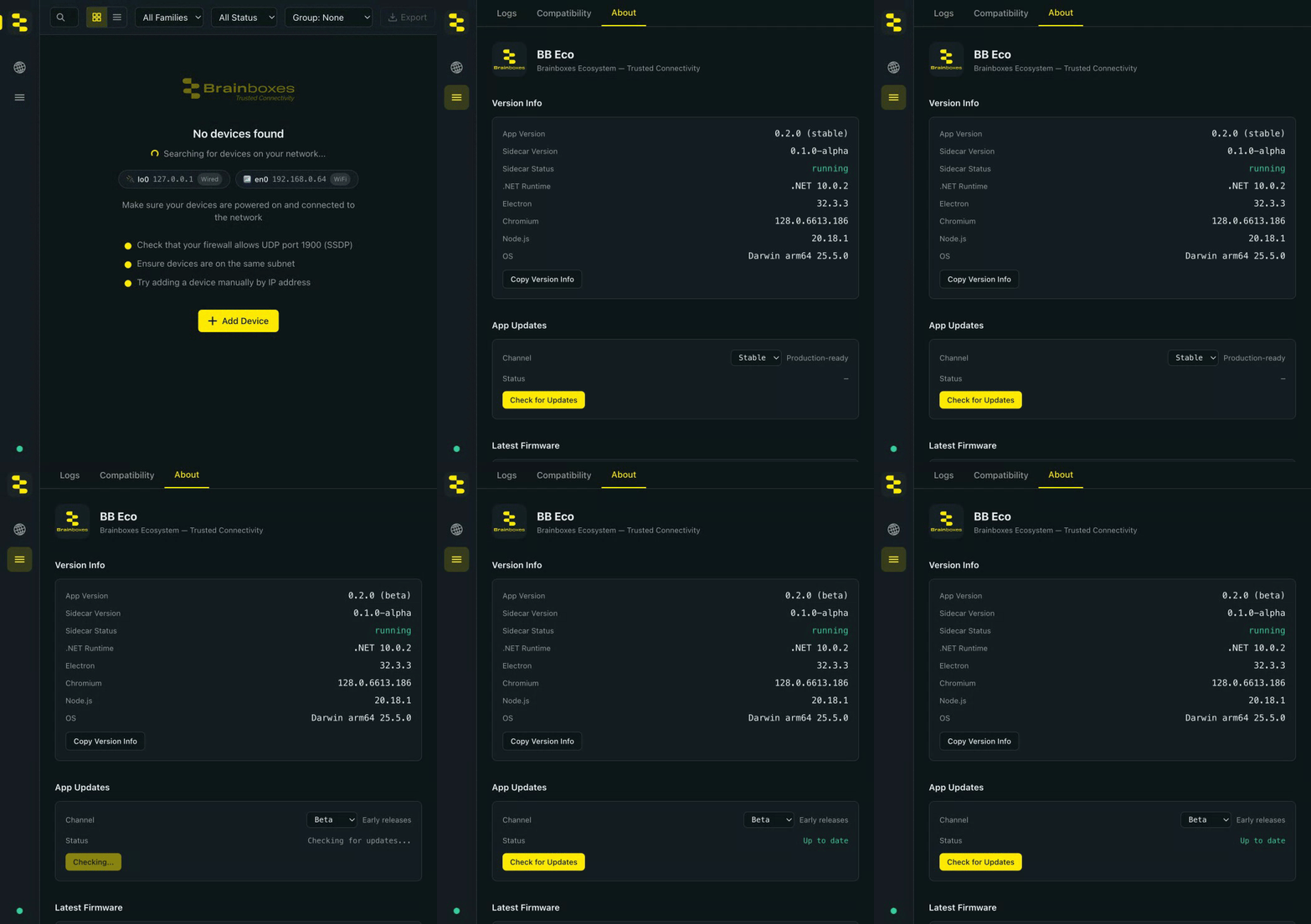
The App Updates panel up close:

The panel has three controls:
- Channel dropdown —
StableorBeta. The text next to it spells out which path you're on (Production-ready vs Early releases). - Status — last update check result (
Idle,Checking…,Up to date,Update available — downloading…,Update downloaded — restart to install,Error). - Check for Updates button — runs an immediate check, regardless of the schedule.
Switching channels
| If you want… | Pick this channel |
|---|---|
| Production stability, slower cadence, every release notarised + signed | Stable |
| Earliest access to new features, faster cadence, occasionally rough edges, helpful for testing fixes the team's working on | Beta |
An install made from a beta installer defaults to the beta channel; a stable installer defaults to stable — so you keep receiving the flavour you chose, without touching settings.
Switching:
- Settings → About → Channel — pick the new channel from the dropdown. The first time you pick Beta, BB-Eco explains that anonymous firmware-update diagnostics are always on for beta builds and asks you to agree (see Diagnostics and privacy); it will not ask again.
- BB-Eco clears its update cache (so you don't see a stale "no update available" answer based on the old channel).
- The next update check uses the new channel's manifest. Click Check for Updates if you don't want to wait for the scheduled poll.
If you're on a beta build (e.g. 1.1.0-beta.3) and switch to Stable, the auto-updater will only offer you the latest stable. If that latest stable is older than your installed beta version, the auto-updater won't downgrade you automatically — you'd need to uninstall the beta and install the stable build manually from update.brainboxes.com/bb-eco/stable/.
Where updates come from
| Channel | Manifest URL |
|---|---|
| Stable | https://update.brainboxes.com/bb-eco/stable/stable.yml |
| Beta | https://update.brainboxes.com/bb-eco/beta/beta.yml |
The update server is HTTPS-only and the released artefacts are signed and (on macOS) notarised. If your network blocks update.brainboxes.com, the auto-updater will fail silently — the Status row will show Error and BB-Eco will continue to run with the version you have. Either ask your network team to allow the host or download the installer manually and apply it.
Force a check
Click Check for Updates in Settings → About. The button polls the channel's manifest immediately and reports the result in the Status row. If a newer version is available, BB-Eco downloads it in the background; you'll be prompted to restart when the download completes.
Verify the version you're running
The App Version row at the top of the About tab shows the running build, with the channel in parentheses — e.g. 0.2.0 (stable) or 1.1.0-beta.3 (beta). The Sidecar Version row beneath it confirms that the bundled .NET sidecar is the matching build:

From the command line:
bb-eco --version
prints the same value.
Air-gapped sites
If your machine has no path to update.brainboxes.com, the auto-updater can't reach the manifest. Two options:
- Run BB-Eco as-is. It'll keep working with the version you have. The Status row will show
Errorafter each scheduled check; that's expected. - Manual updates. On a machine that does have internet access, download the installer for your platform from the appropriate channel URL above. Copy it across to the air-gapped machine and run it like a fresh install — your local config, device cache, and template cache are preserved.
For broader guidance on running BB-Eco offline, see Run BB-Eco without internet access.
Updating the CLI
The standalone CLI does not auto-update — there's no resident process to schedule a check. To update, re-download and replace the binary:
# Windows — overwrites the existing bb-eco.exe in place
Invoke-WebRequest https://update.brainboxes.com/bb-eco/beta/cli/win-x64/bb-eco.zip -OutFile bb-eco.zip
Expand-Archive -Force bb-eco.zip
Move-Item -Force bb-eco\bb-eco.exe $env:LOCALAPPDATA\Programs\bb-eco\
bb-eco --version
Swap beta for stable for the production channel. Each download URL is permanent — same command always pulls the current build for the channel.
To check what version a download contains before replacing yours, fetch the channel manifest:
# Reads version + sha512 of the current published build
Invoke-WebRequest https://update.brainboxes.com/bb-eco/beta/cli/win-x64/beta.yml | Select-Object -ExpandProperty Content
Roll back to a specific version
The public download URL (e.g. BB-Eco-Setup-x64.exe) always points at the latest build on the chosen channel. To install a specific older version — for instance to reproduce a bug or to stay on a known-good build while a regression is investigated — contact Brainboxes support and we'll send you the matching installer from our build archive.
To stop the auto-updater pushing you back to the latest, switch to the Stable channel even if you're running an older stable build; the updater won't downgrade you.
More resources
- Install BB-Eco — initial install on macOS, Windows, or Linux
- Run BB-Eco without internet access — airgapped factory floors and Cyber Essentials admin accounts
- General troubleshooting with BB-Eco — if an update fails or the Status row shows Error