Diagnostics and privacy in BB-Eco
The wording on this page is awaiting legal review and may change.
BB-Eco can send Brainboxes a short, anonymous report after each firmware-update attempt. The feature is off by default. It exists for one reason: firmware updates that fail in the field are hard to reproduce on a bench, and knowing which models, firmware versions and error categories fail, across many sites, is how we find and fix them.
Turning it on and off
BB-Eco asks once, the first time you open a device's Firmware tab: a short card at the top of the tab with Yes, share diagnostics and No thanks, and a See what is sent link that shows an example report before you decide. It never asks again after either answer, and nothing is sent unless you choose Yes. You can change your answer at any time in the places below.
In the app: Settings -> General -> Share anonymous firmware-update diagnostics.
From the command line: bb-eco telemetry on and bb-eco telemetry off. Both write the same
setting, so whichever you use last wins.
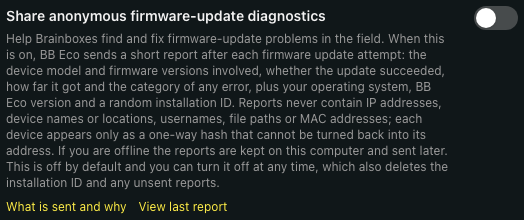
Turning it off deletes the installation ID and any reports that have not been sent yet. Nothing is sent afterwards.
The beta channel
On the beta channel the reports are always on and the switch is shown on and locked. Beta builds are pre-release, and these reports are how firmware-update problems are found before they reach the stable release. You agree to this when you install a beta build (the installer says so) or when you switch to the beta channel on Settings -> About, where BB-Eco asks once and remembers your answer. Switching back to the stable channel makes the reports optional again; if you had never turned them on yourself, the installation ID and any unsent reports are deleted at that point, exactly as if you had turned them off.
What a report contains
One report is sent per firmware-update attempt (a single device, a device in an
Update all batch, an automatic update, or a bb-eco upgrade run). It carries:
| Field | Example | Why |
|---|---|---|
| Outcome | Failed | Success rate per model and version |
| Device model and family | ED-588, ED | Which hardware is affected |
| Microcontroller class | Tiva | Different chips take different upgrade paths |
| Hardware variant | T, 0x100A0002 / 0x1034C06E | The firmware-type letter, the flash size and the microcontroller's identification codes, which together say which hardware build of a model the device is. A problem confined to one build is invisible without them. These are part codes shared by every unit of that build, not serial numbers |
| Firmware version before and after | 8.25 -> 8.33 | Which releases introduce or fix problems |
| How far the update got | FirmwareAppUpgrade | Whether the failure was before or after the device committed to the new image |
| Error category | ConnectionReset | A fixed list of classes, never the error text |
| Duration | 74.2 seconds | Transfer speed regressions |
| Trigger | Manual, Bulk, Auto, Cli | Which entry point was used |
| UDP pre-flight result and network type | Passed, Ethernet | Firewall and Wi-Fi related failures |
| Device identifier | 8020e4d0... (32 hex characters) | Tells repeated attempts on one device apart from attempts on many |
| BB-Eco version, release channel, operating system and CPU architecture | 0.9.0-beta.140, beta, windows 10.0.22631, x64 | Which builds are affected |
| Installation ID | a random UUID | Groups reports from one installation; used to honour deletion requests |
Three smaller report types use the same channel: a summary when an Update all batch finishes (counts only), a note when BB-Eco's recovery radar hears a device stuck in its bootloader (device identifier and model only), and a single consent record when you turn the feature on.
Sending one report by hand
With diagnostics off, nothing is sent automatically. After a failed update the Firmware tab, and each failed row of the Update all report, offer Send report to Brainboxes. You see the report before it goes. It is the same update report described above, sent once under a random one-off identifier: it carries no installation ID, the device identifier is hashed with a secret used for that one report and then discarded, and nothing links it to your installation or to any other report. BB-Eco shows a reference number you can quote to support.
You can see exactly what was sent, at any time: Settings -> General -> View last report,
or bb-eco telemetry show-last. Before anything has been sent the app shows a sample built
from a placeholder device.
What a report never contains
- IP addresses, subnet masks, gateways or DNS servers
- MAC addresses
- Device names, locations or any other text you typed into a device
- Usernames, passwords or other credentials
- File paths, computer names or user account names
- Serial data, IO values or anything that passes through a device
- Log files or log excerpts
- Error message text (only the category)
Every report is checked against a deny-list before it leaves your computer. If a report matches anything that looks like an address, a path or an e-mail, the whole report is dropped and a warning is written to the local log; nothing is rewritten and sent anyway. The server applies the same checks again and refuses anything that slips through.
About the device identifier
The device identifier is a one-way hash of the device's MAC address combined with a random secret that is generated on your computer when you opt in and never sent to Brainboxes. Without that secret the identifier cannot be turned back into a MAC address, and the same device produces different identifiers on different installations. Turning diagnostics off and on again generates a new secret, so the device gets a new identifier; we cannot follow a device across that boundary, and we do not try to.
When and where reports are sent
Reports are queued on your computer and sent over HTTPS to
update.brainboxes.com/telemetry/, the same host BB-Eco already uses for software updates
and firmware downloads. If you are offline, up to 500 reports (2 MB) are kept and sent later;
older ones are discarded first. The queue is flushed shortly after BB-Eco starts, every ten
minutes while it runs, and a few seconds after each new report. While anything is waiting,
Settings -> General shows a Send queued reports now link that sends immediately.
Reports are received by a service Brainboxes runs on Cloudflare and stored in a database on a server operated by Brainboxes. Only Brainboxes engineers have access. The receiving service accepts at most 20 submissions a minute from one installation and refuses anything that is not a well-formed BB-Eco report.
Retention and deletion
- Reports are kept for 400 days (about 13 months) and then deleted automatically.
- To have everything your installation has sent deleted earlier, e-mail
[email protected] with the installation ID shown on
the Settings page or by
bb-eco telemetry status. The installation ID is the only key we hold for your data. If you turned diagnostics off and on again, include every ID you had.
Legal basis
Diagnostics are sent only with your consent, given by turning the feature on, and consent is withdrawn by turning it off. The installation ID and the device identifiers are pseudonymous identifiers; Brainboxes Limited is the data controller and Cloudflare, Inc. is the processor that operates the receiving service. Brainboxes does not use these reports for marketing, does not share them with third parties, and does not combine them with any account, licence or sales data.
Consent versions
| Version | Introduced | Change |
|---|---|---|
| 1 | September 2026 | First release of the feature, as described on this page |
| 2 | September 2026 | The update report also carries the device's hardware variant (firmware-type letter, flash size, chip identification codes) |
BB-Eco records the consent version you agreed to. A future release that needs to send anything not listed here will introduce a new version and will not send the new data under the old consent.
