
BB-400 Quick Start Guide
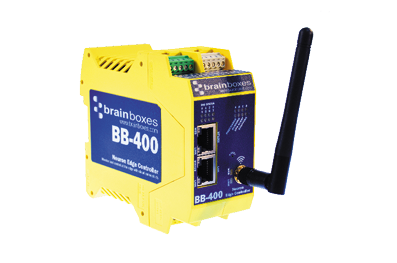
The Brainboxes BB-400 is an industrial NeuronEdge controller. This guide will help you set up your BB-400. Out of the box your BB-400 comes with sensible defaults to help you get started fast.
For more detailed information, the product manual, and a host of resources for programming and software integration visit www.brainboxes.com.
Risk of injury from energy stored in capacitors. Wait at least 5 minutes after shutdown of device before opening case.
Overview
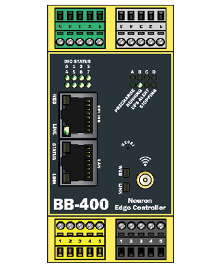
The BB-400 features:
- Uplink — Ethernet uplink port
- LAN — Local area network port
- Wi-Fi Antenna — wireless connectivity
- Reset — device reset button
- Power State — power status LEDs
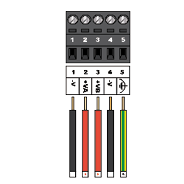
- Serial — RS232/RS422/RS485 serial port
- Power — +5VDC to +30VDC power input
- DIO 0-3 — digital I/O lines (group 1)
- DIO 4-7 — digital I/O lines (group 2)
- DIO Status — I/O status LEDs
- A Admin — admin interface
- B NFC — near-field communication (coming soon via software update)
- C Serial — serial interface
- D Bluetooth — Bluetooth connectivity
Power Supply
Connect a power supply providing +5VDC to +30VDC, 15W max typical power.
The optional PW-400 power supply (available in UK/EU/US/AUS variants) is suitable for use with the BB-400.
Power State LEDs

The power state LEDs indicate: Precharge, Running, UPS, Alert, and Stopping.
Real Time Clock
The BB-400 includes an optional real time clock (RTC). Battery not included.
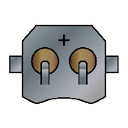
To set the clock via terminal:
bb@bb400-XXXX:~ $ sudo bb config.system.rtc true
Network Discovery
The BB-400 can be accessed via three methods:
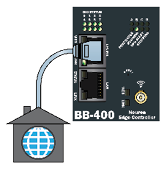
Uplink
Connect the BB-400 Uplink port to your network. The device will be discoverable on your local network.
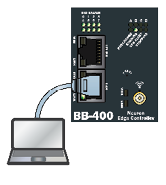
LAN
Connect your computer directly to the BB-400 LAN port.
Wi-Fi Hot Spot
Connect to the BB-400 Wi-Fi access point:
| Parameter | Value |
|---|---|
| IP Address | 192.168.127.2/24 |
| SSID | BB-400-XXXX |
| MAC | 00:0A:4F:40:XX:XX |
Login

Secure webpages require an SSL certificate. This can only be applied for once an IP address or name has been assigned. This is the case for all IoT devices. The connection however is encrypted and secure.
Digital I/O

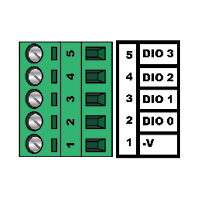
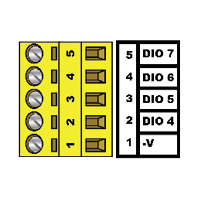
The BB-400 has 8 digital I/O lines split into two groups:
DIO 0-3 (Green terminal block):
DIO 4-7 (Yellow terminal block):
Digital Inputs
| Parameter | Specification |
|---|---|
| NPN/PNP | Jumper selectable pull up for NPN (active low) type sensors and pull down for PNP (active high) type sensors |
| Logic Level 0 | 0V to +1V maximum |
| Logic Level 1 | +2.0V to +30V maximum |
| Latched Inputs | Triggered by user programmable positive or negative edges, stays true until acknowledged |
| Counter Inputs | User programmable, counts positive or negative transitions, up to 250Hz count rate. 16-bit (65535 count) or 32-bit (4.2 billion count) counters |
Digital Outputs
| Parameter | Specification |
|---|---|
| Max output current | Sinks up to 0.85 Amp per pin, 30V max load |
| Max combined load | 4 Amps per BB device |
| Max output load voltage | 30V |
| ESD Protection | Protection to 16kV |
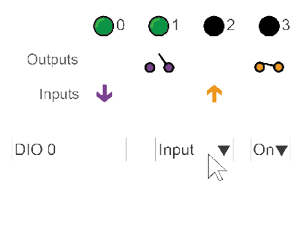
DIO Status
Serial Port
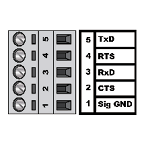
| Pin | Signal |
|---|---|
| 1 | Sig GND |
| 2 | CTS |
| 3 | RxD |
| 4 | RTS |
| 5 | TxD |
Serial Port Settings
| Parameter | Specification |
|---|---|
| Baud Rate | Any custom baud rate between 300 - 921,600 |
| Data Bits | 5, 6, 7 or 8 (1 stop bit) |
| Parity | Odd, Even, None |
| Stop Bits | 1, 1.5 or 2 |
| Flow Control | RTS/CTS, XON/XOFF |
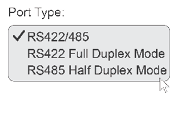
RS422/RS485 Jumper Configuration
The serial port mode is selected via jumpers:
| Jumper Position | Mode |
|---|---|
| Closed | RS422-485 Full Duplex |
| Open | RS485 Half Duplex |
| Default (PARK) | RS232 |
ASCII & REST Examples
ASCII Protocol
| Command | Response | Description |
|---|---|---|
$AAM1 | !AA(Data) | Read device location |
@AA6 | >(Data) | Read Digital I/O Status |
~AAO(Name) | !AA | Set Device Name |
Terminal example:
@01
>00FF
REST API
| Request | Verb | Response |
|---|---|---|
http://bb400-xxxx:9000/io | GET | {"inputs": [1,1,1,1,1,1,1,1], "outputs": [0,0,0,0,0,0,0,0]} |
http://bb400-xxxx:9000/io/inputs | GET | [1, 1, 1, 1, 1, 1, 1, 1] |
http://bb400-xxxx:9000/io/inputs/0 | GET | 1 |
http://bb400-xxxx:9000/io/outputs | GET | [0, 0, 0, 0, 0, 0, 0, 0] |
http://bb400-xxxx:9000/io/outputs | POST | 200 OK (body: [1,1,1,1,0,0,0,0]) |
Software & APIs
| Protocol | Endpoint |
|---|---|
| REST | http://bb400-xxxx:9000/io |
| WebSocket | ws://bb400-xxxx:8989 |
| ASCII TCP | bb400-xxxx:9500 |
www.brainboxes.com/bb-400 provides a range of resources and example code to get you started with some common machine monitoring scenarios. Sample code is available in the following languages:
- .NET C# & VB
- Python
- Node.js
- Node-RED (visual coding interface)
Operating System
The BB-400 runs Raspbian Lite, based on Debian Linux.
Docker
Docker is an online repository for secure/isolated apps that can run on your BB-400. To get started search for Brainboxes and find prebuilt containers.
Other Connections and Updates
It is recommended to install all updates when you first use the device. This will ensure you are running the latest version of the operating system and software.
- NFC — Tap your smartphone or NFC enabled device to get device status information and IP address (coming soon via software update)
- Modbus — Support for Modbus TCP (coming soon)
Next Steps
- BB-400 Reference Manual — detailed product specifications, I/O configuration, and hardware reference
- Finding your BB-400 on the network — network discovery methods
- Controlling I/O via REST API — read and write digital I/O using HTTP requests
- Controlling I/O via curl — command-line I/O control examples
- Configure the BB-400 Serial Port — RS-232, RS-422, and RS-485 setup
- BB-400 Troubleshooting — diagnose power, network, and I/O issues