Keep Brainboxes firmware up to date automatically with BB-Eco
Automatic firmware updates are available on Windows and macOS. The option is not offered on Linux, where firmware transfers need elevated privileges that cannot be granted unattended.
Automatic updates are for networks where you want every Brainboxes device on the current firmware without anyone scheduling a batch. BB-Eco does the same sequential, one-device-at-a-time update as Update all, but starts it itself whenever it finds a device running older firmware than the current release.
Turn it on
- Open Settings -> General.
- Switch on Automatically update device firmware.
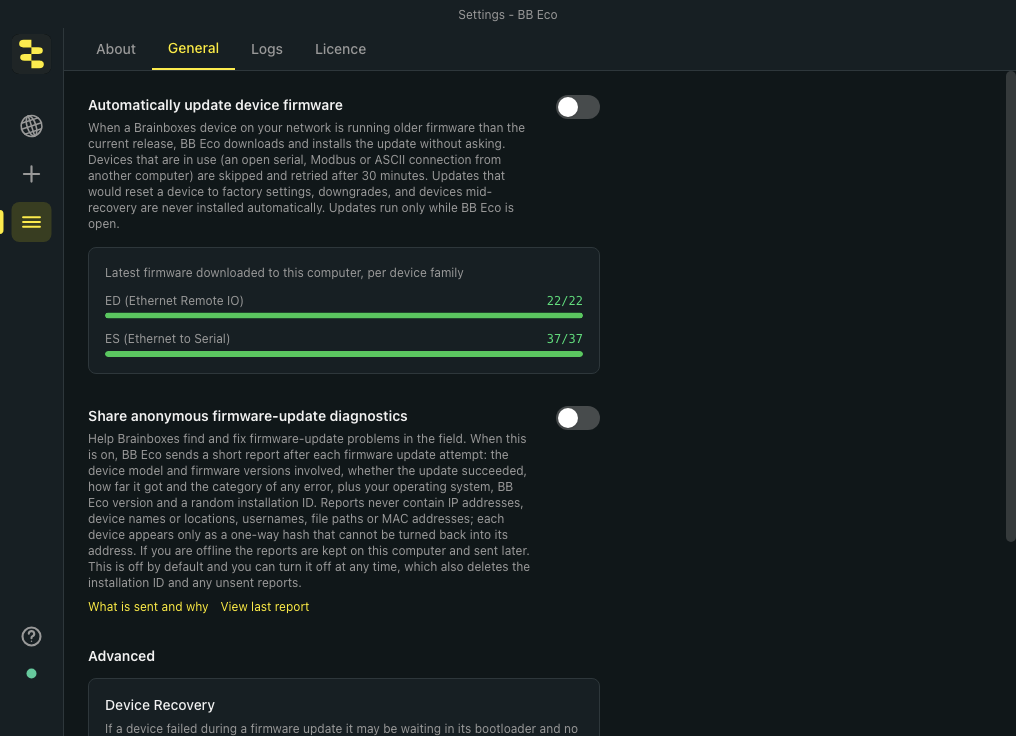
That is the whole setup. The switch is stored on this computer only; each computer running BB-Eco decides for itself.
What happens
- While BB-Eco is open, every device it discovers or re-discovers is checked against the current release for its model. Devices running older firmware are collected for a few seconds, the firmware is downloaded if it is not already cached, and one batch starts. The activity bar along the bottom of the window shows progress exactly as for a manual Update all.
- A device that is in use (another computer has an open serial, Modbus or ASCII connection to it) is skipped and retried after 30 minutes. BB-Eco tells you which device was deferred and why:
ED-549 "Line-A" is in use - automatic firmware update deferred for 30 minutes. - A failure does not pause the batch: the remaining devices are still updated, and the failure is in the report.
- When the batch finishes, a notification summarises it (
Firmware updated automatically on 2 devices., plus1 failed - see the report.if needed) with a Details button. The report is the same as for Update all. - Each device is attempted at most once per BB-Eco session for a given target version. If it fails, it is not retried until BB-Eco is restarted, so a broken device cannot be flashed in a loop.
What is never done automatically
- Updates that would reset a device to factory settings.
- Downgrades, and updates for devices whose firmware BB-Eco cannot read.
- Devices that are mid-recovery or already updating.
- Anything while a manual Update all batch is running; the automatic batch waits for it to finish.
- Anything while BB-Eco is closed. Automatic updates run only while the app is open.
Turn it off
Switch off Automatically update device firmware in Settings -> General. No new batch starts after that. A batch already in progress runs to completion; use Stop after this device on the activity bar to end it after the current device.
Good practice
- Leave the computer that runs BB-Eco on wired Ethernet in the same broadcast domain as the devices.
- Read the release notes when a new firmware appears on the channel. If a release needs a factory reset for some models, those devices will show the orange Update pill but wait for you.
- Turn on Share anonymous firmware-update diagnostics so failures in unattended updates reach us.
More resources
- Update firmware on every device at once - the manual batch this feature builds on
- Recover an ED device stuck in bootloader
