PX Technical Specifications
Supported Serial Settings
| Serial Setting | Supported Values |
|---|---|
| Baud Rate | Up to 921,600 |
| Data Bits | 5, 6, 7 or 8 |
| Parity | None, Odd, Even, Mark & Space |
| Stop Bits | 1, 1.5 or 2 |
| Handshaking | RTS/CTS, DTR/DSR, Xon/Xoff |
| Break | Supported |
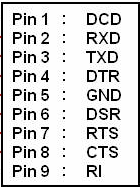
Device Pin-out
RS-232 Devices
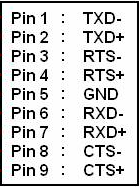
RS-422/485 Devices
Important Notes
- DTR/DSR Handshaking is not available on RS-422/485 devices.
- For RS-422 FULL Duplex Communications, please note the pin outs above.
- To achieve RS-485 Half Duplex Communications, using two wires for communication, Pins 1 and 6 must be shorted and 2 and 7 must also be physically shorted. This can be done by using the on-board jumpers or via the on-board Multi-plex jumpers.
- Once your wiring is setup, you will also need to set the card to FULL or HALF Duplex mode in the software. For further details, see RS-422/485 Settings and Information.
Regulatory Approvals / Compliance
For up to date details of global certifications, please check the product datasheet on the Brainboxes website.
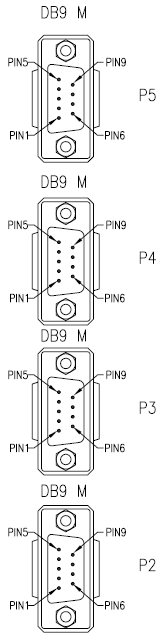
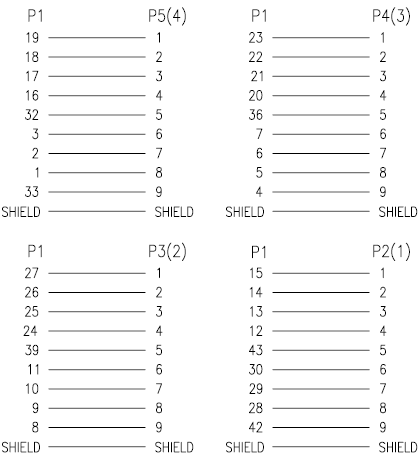
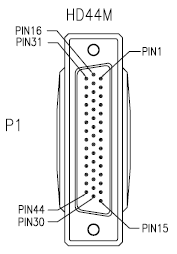
Pinout for 44Way D-connector Split Cable
Applicable to PX-260/701/346/335/368
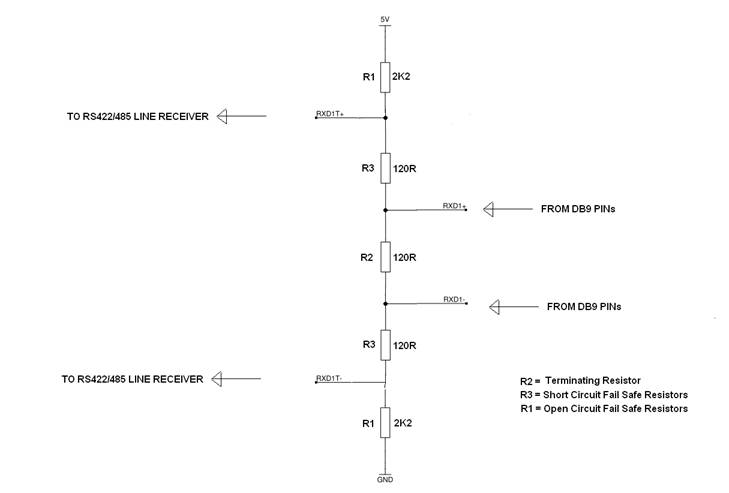
RS-422/485 Bias/Terminating Resistors
Applicable to RS422/485 products only