
ES Light-Industrial Technical Specifications
Device specification
Network connection
- 10Base-T or 100Base-TX Ethernet connection
- Standard 8P8C ("RJ45") socket connector
- TCP/IP protocol stack
- DHCP or static IP address
- Automatic transmit/receive crossover detection
- 1500V isolation
RS-232 Serial Port
- Baud rates up to 1M Baud
- 5, 6, 7 or 8 data bits
- 1 or 2 stop bits
- Odd, even, mark, space or no parity bit
- Line-break generation and detection
- RTS/CTS, DTR/DSR or XON/XOFF flow control option (terminal block models do not support DTR/DSR)
- ESD protection to 15kV human body model
- Can be connected to as a Windows COM port, as a raw TCP socket, or using the RFC2217 standard
- Serial cable length: 3m maximum (EU only)
RS-422/485 Serial Port
- Baud rates up to 1M Baud
- 5, 6, 7 or 8 data bits
- 1 or 2 stop bits
- Odd, even, mark, space or no parity bit
- Line-break generation and detection
- RTS/CTS and XON/XOFF flow control option (terminal block models do not support RTS/CTS)
- Automatic switching between transmit and receive states in half-duplex mode
- 3-wire half-duplex RS-422/485 link mode
- Built-in termination and biasing at receiver inputs
- Can be connected to as a Windows COM port, as a raw TCP socket, or using the RFC2217 standard
- Serial cable length: 3m maximum (EU only)
Power
- Wide-range 5-30V DC power input (1.0W typical, 1.8W maximum)
- Reverse voltage protected
- ESD and surge protected
- Earthing connection point
| ES Device | Recommended Power Supply |
|---|---|
| ES-246 | Shipped as standard with PW-800 (UK) / PW-800 (EU) (5V, 550mA) |
| ES-257 | Shipped as standard with PW-800 (UK) / PW-800 (EU) (5V, 550mA) |
| ES-313 | Shipped as standard with PW-800 (UK) PW-800 (EU) (5V, 550mA) |
| ES-320 | Shipped as standard with PW-800 (UK) / PW-800 (EU) (5V, 550mA) |
| ES-357 | Optional PW-644 (UK) / PW-611 (EU) (5V, 550mA) |
| ES-020 | Optional PW-644 (UK) / PW-611 (EU) (5V, 550mA) |
LED indicators
- Indicators for the network and serial ports show when a connection is open and when data is being transferred.
- Three-colour status LED provides additional information on the status of the device.
For more information see LED information in the Hardware Features section.
Physical
- Plastic enclosure
- Mounting flanges for wall-mounting or attachment of optional DIN-rail mounting kit
DB9 Connector Pin-out (dependent on ES Model)
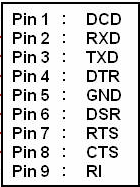
The ES devices which have DB9 connectors have the following set of signals.
RS-232 Port
RS-422/485 Port
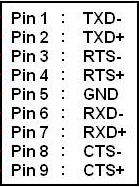
For RS-422 FULL Duplex Communications, please note the pin outs above.
To achieve RS-485 Half Duplex Communications, using two wires for communication, Pins 1 and 6, 2 and 7 must be physically shorted.
Once your wiring is setup, you will also need to set the device to FULL or HALF Duplex mode in the software. For further details, see the RS-422/485 Settings section.
Terminal Block Connector Pin out (dependent on ES Model)
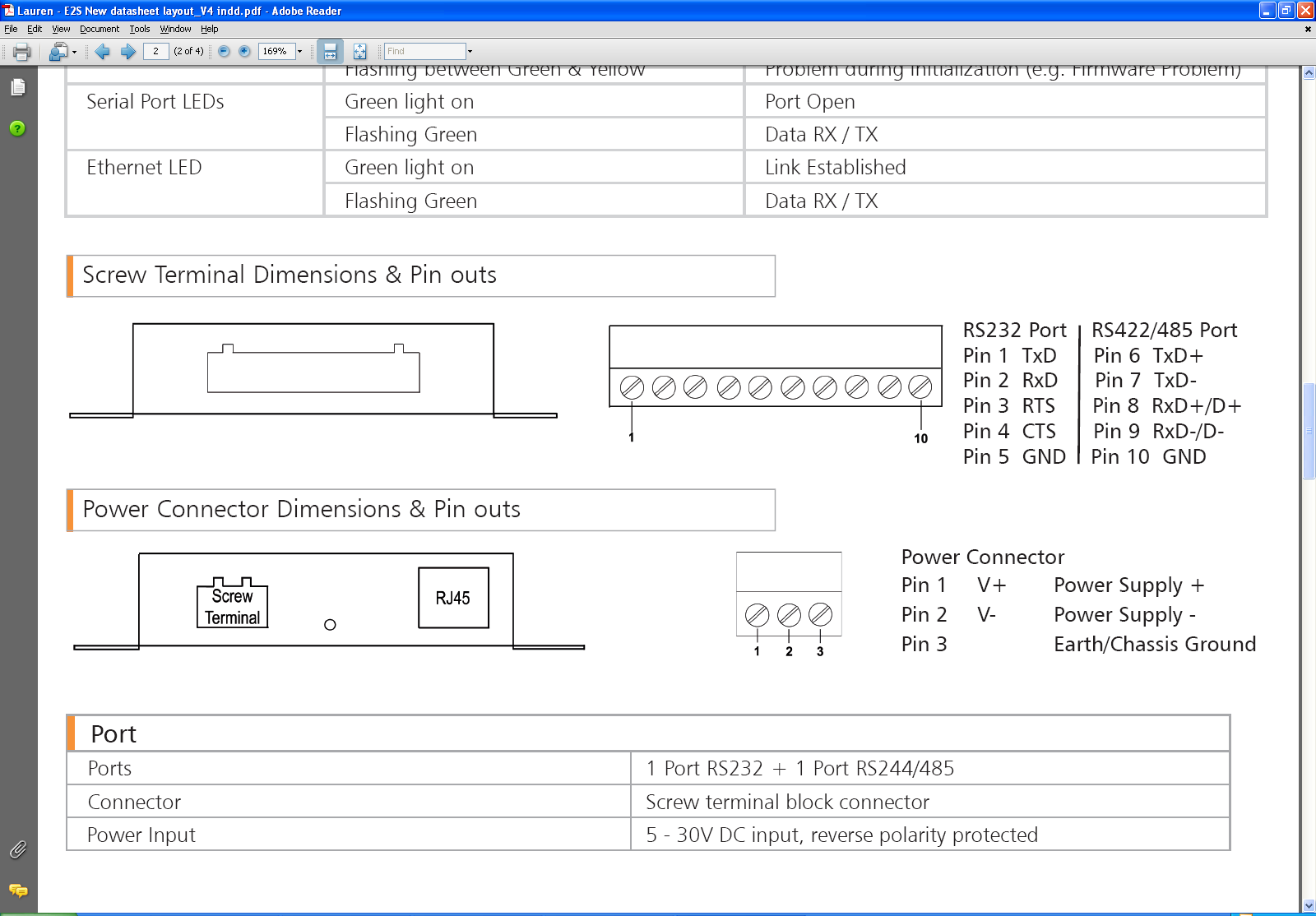
For ES devices with terminal block connectors have the signals detailed below.
RS-232 & RS-422/485 Port (e.g. ES-357)
For RS-422 FULL Duplex Communications, please note the pin outs above.
To achieve RS-485 Half Duplex Communications on a terminal block, using two wires for communication, you need to use the "Data" pins marked with D+/D-. E.g. for the ES-357 this would be Pin 8 and Pin 9.
Once your wiring is setup, you will also need to set the device to FULL or HALF Duplex mode in the software. For further details, see the Advanced Configuration section.
Power Terminal Block
Storage and Operating Environment Guidelines
Storage
| Parameter | Range |
|---|---|
| Temperature | -10°C to +70°C |
| Humidity | 8% to 95% non-condensing |
Operational
| Device Models | Temperature Range |
|---|---|
| ES-511/522/551/571 | -30°C to +80°C |
| ES-246/257/446/457/320/313/413/420/357/020 | 0°C to +60°C |
| Parameter | Range |
|---|---|
| Humidity | 20% to 75% non-condensing |