SW-0016 Port Numbering — How Are the 16 Ethernet Ports Numbered?
What is this FAQ for?
The SW-0016 is a Light Industrial 16-port 10/100 Ethernet switch. Its RJ45 ports are arranged as stacked (two-high) connectors split across the top and bottom faces of the enclosure, and the numbering runs along each row rather than down each column. This catches people out, so this FAQ explains exactly how ports ETH 1–16 are laid out and labelled.
How are the ports arranged?
The 16 ports are split into two banks of eight:
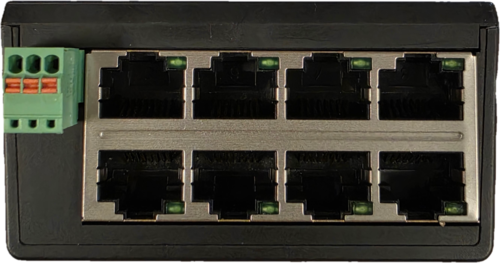
- Ports ETH 1–8 are on the top face (next to the power/earth terminal block).
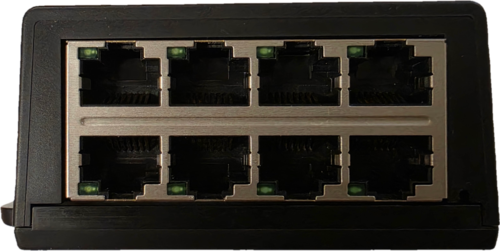
- Ports ETH 9–16 are on the bottom face (next to the POWER indicator).
Each bank is a block of four columns by two rows of stacked RJ45 connectors. The arrows printed on the label tell you which physical row a number belongs to:
- ▲ (up arrow) = the upper RJ45 in each stacked pair.
- ▼ (down arrow) = the lower RJ45 in each stacked pair.
Port numbering map
The tables below mirror the SW-0016 label exactly, as you look at the front of the unit.
Top face (ports ETH 1–8)
| Row | Column 1 | Column 2 | Column 3 | Column 4 |
|---|---|---|---|---|
| ▲ Upper | ETH 1 | ETH 2 | ETH 3 | ETH 4 |
| ▼ Lower | ETH 5 | ETH 6 | ETH 7 | ETH 8 |
Bottom face (ports ETH 9–16)
| Row | Column 1 | Column 2 | Column 3 | Column 4 |
|---|---|---|---|---|
| ▲ Upper | ETH 9 | ETH 10 | ETH 11 | ETH 12 |
| ▼ Lower | ETH 13 | ETH 14 | ETH 15 | ETH 16 |
The key point to remember
Numbering fills each row left-to-right first, then moves to the row below — it does not increment vertically within a stacked pair. In practice this means:
- Port ETH 5 sits directly below ETH 1, ETH 6 below ETH 2, and so on.
- On the bottom face, ETH 13 sits directly below ETH 9, ETH 14 below ETH 10, and so on.
So if you are looking for consecutively numbered ports (e.g. ETH 1 and ETH 2), they are the two upper connectors side by side, not stacked one above the other.
All 16 ports are identical 10/100BASE-T(X) ports with Auto MDI/MDIX, so the numbering is purely for identification and cabling records. There is no "uplink" or dedicated port — any device can be connected to any port.
The green terminal block on the top face (marked FE · ⏚ · -V · +V) is the power and Functional Earth input, not an RJ45 port. See the SW Quick Start Guide for wiring the power connector.
Related pages
- SW Ethernet Switches Reference Manual — full SW range reference
- SW 16-Port Range Datasheet — specifications for the 16-port models
- SW range hub — quick start guides, datasheets, and test results for the SW range
