
PX Boost.PCIe Driver Upgrade / Rollback
There are several parts to the Boost.PCIe driver:
For RS-232
Example:
- Card driver: "Brainboxes PCIe 4 Port RS-232 Serial Card (PX-260)"
- Port driver: "Brainboxes RS-232 Serial Port (COM3)"
For RS-422/485
Example:
- Card driver: "Brainboxes PCIe 2 Port RS-422/485 Serial Card (PX-313)"
- 422/485 driver: "Brainboxes RS-422/485 Controller"
- Port driver: "Brainboxes RS-422/485 Serial Port (COM3)"
If you need to upgrade or roll back the Boost.PCIe driver, we recommend to completely uninstall the existing drivers first, and then to install the new drivers from fresh. This will restore all settings to factory default.
However, if you instead wish to retain your settings, you can use the "Update Driver" or "RollBack" in Device Manager for upgrading/rolling back the Boost.PCIe driver.
Upgrading the Boost.PCIe Driver
-
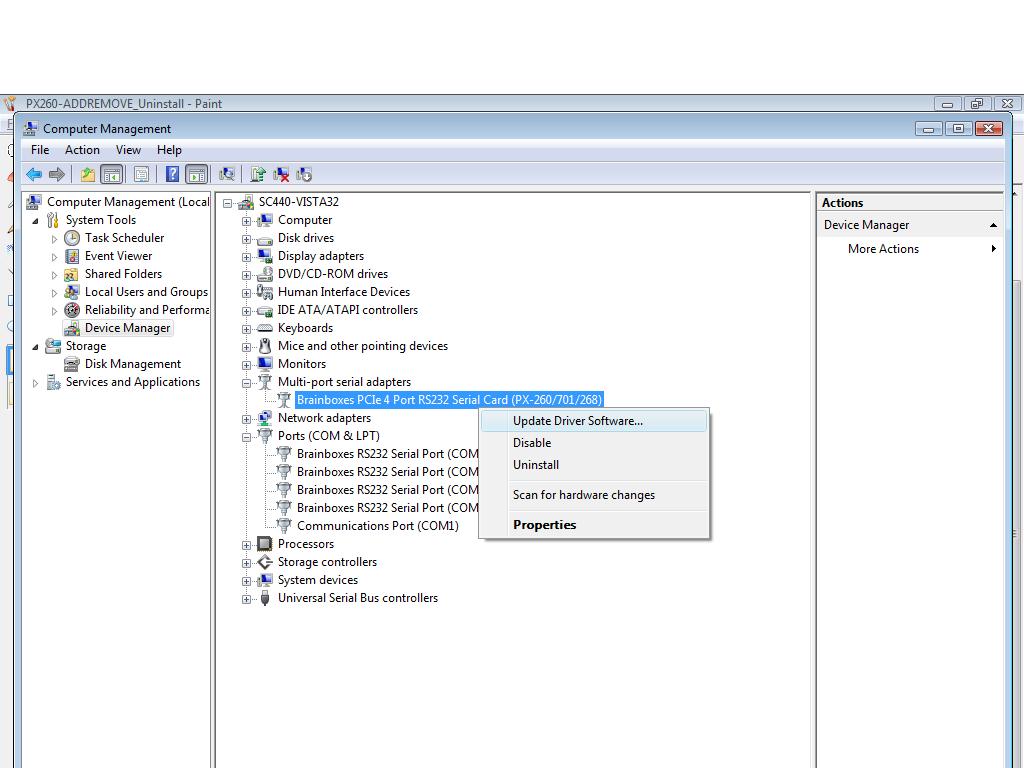
Go to Device Manager and Right Click on the Serial Card entry (Found under Multiport Serial Adapters - see image below)
-
Select Update Driver. This will launch the Found New Hardware Wizard. Follow the on screen instructions and point to the location of the new driver package.
It is only possible to upgrade the Boost.PCIe driver via the Serial Card entry in Device Manager and not the Serial Port entry. The upgrade process will automatically upgrade the Port driver.