
Track configuration drift on your devices with BB-Eco
When a device's live configuration diverges from the last configuration you blessed, that's drift — someone fixed a baud rate by hand, a web-UI visit saved an accidental change, a replacement unit came in with factory settings. BB-Eco notices for you: it records a baseline for every device it manages and flags any difference between that baseline and the live device.
Before you start
- BB-Eco has discovered your devices.
- You know how templates work — a drift report is a comparison against one.
Baselines are automatic
The first time BB-Eco sees a device, it captures the device's configuration as its baseline — you'll briefly see Capturing initial configuration… in the Configuration Status section of the Info tab. No setup required. From then on, BB-Eco re-reads the device's configuration in the background and compares.
Spot drift in the dashboard
A drifted device shows a drift indicator on its dashboard card (next to the MAC address), so a whole fleet is scannable at a glance. Open the device's detail panel for the specifics — each drifted setting renders as the struck-through baseline value, an arrow, and the live value:
A single drifted row reads like this — left of the arrow is what the baseline recorded, right is what the device says now:

The Configuration Status section totals the changes and shows when the baseline was recorded:
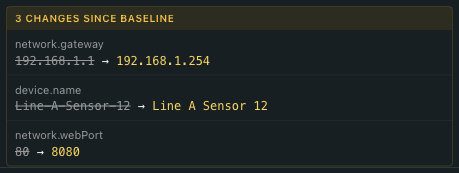
When nothing has changed, the section simply reads In sync with baseline.
Verify from the CLI
bb-eco template diff compares a live device against any template file — the exported baseline, or a fleet standard from Git:
bb-eco template diff 192.168.2.97 es-522-baseline.json
Device is compliant — 32 field(s) match template.
And when something has drifted:
Section  Key          Template     Actual                                Status
-------  -----------  -----------  ------------------------------------  ------
device   device.name  Line3-ES522  Brainboxes ES-522 Ethernet to Serial  DRIFT

DRIFTED: 1 field(s) differ, 31 match.
Fields set to null in the template are "don't care" and never count as drift.
Decide: revert or re-baseline
Drift itself isn't the problem — undecided drift is. Two buttons on the Info tab map to the two decisions:
| Decision | When | In the app | In the CLI |
|---|---|---|---|
| Revert — the template is right | The change was unintentional | Apply Template with your baseline file | bb-eco template apply (use --dry-run first) |
| Re-baseline — the device is right | The change was deliberate | Refresh baseline | bb-eco template export, commit the diff to Git |
After you intentionally change settings, refresh the baseline straight away — then future drift is tracked from the new state, not the old one.
Next step
One device is a habit; a fleet is a workflow. Detect configuration drift across your fleet covers scheduled CLI audits, CI integration, and site-specific template overrides.
More resources
- Configure your first device — where the baseline template comes from
- Configuration as code with BB-Eco — the rationale
bb-eco template diffCLI reference — options and real output- BB-Eco template JSON format — which fields are compared, which are ignored